AMP with Magento2: Get to Know How Fast Loading Pages Can Win Customers
Page speed is no longer just a technical detail. It directly impacts how your Magento store performs in search, how users engage, and how much you sell. Search engines like Google now focus heavily on speed and user experience when ranking websites. If your store loads slowly, it does not just affect visibility. It also reduces trust and pushes potential customers away.
In India, where mobile browsing dominates, speed becomes even more critical. Most users rely on mobile data, and they expect pages to open instantly. Even a small delay can break the experience. When that happens, users leave your site and move to a competitor offering a faster and smoother journey. This behaviour is common and growing rapidly in ecommerce.
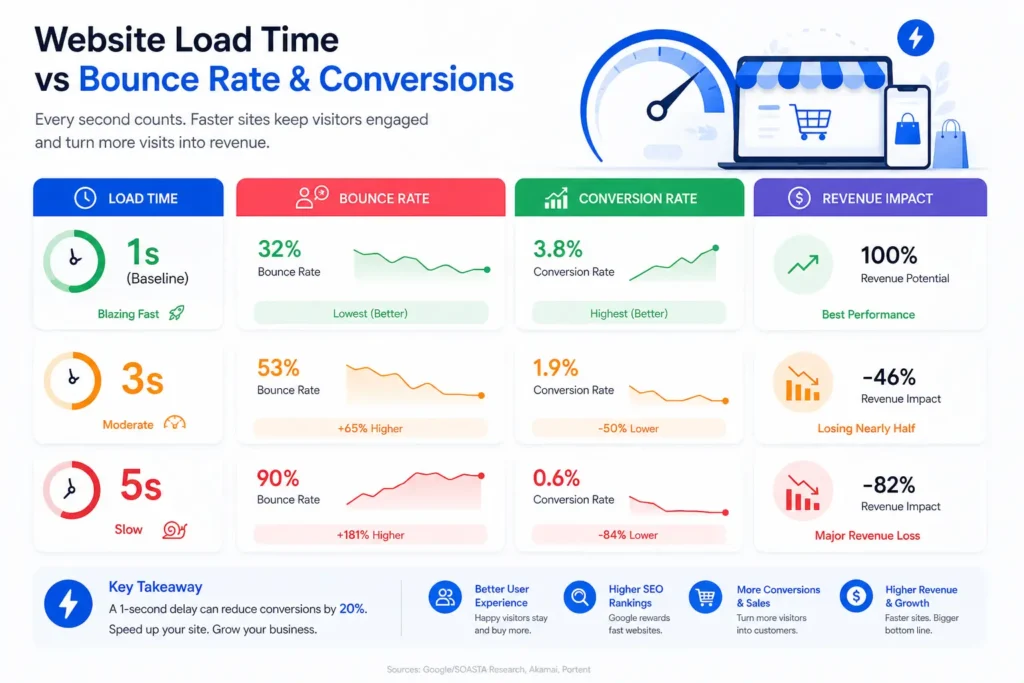
A slow Magento 2 store creates a clear negative cycle. Users land on your site but face delays. As a result, they lose interest. Bounce rates increase, engagement drops, and conversions take a hit. Recent insights show that even a one-second delay can lower conversions noticeably. That is why businesses now treat Magento 2 performance optimisation and fast loading ecommerce websites as essential, not optional.
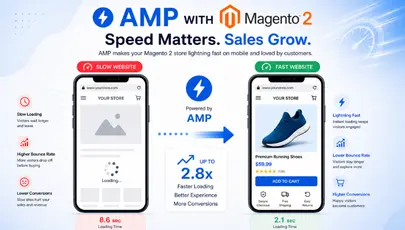
To address this challenge, Accelerated Mobile Pages (AMP) offers a practical solution. AMP focuses on speed by simplifying page structure and removing unnecessary elements. This allows pages to load almost instantly across devices. For Magento 2 stores, this means better performance, improved user experience, and higher chances of retaining visitors.
AMP also plays a key role in improving the overall shopping journey. Faster pages reduce waiting time, keep users engaged, and encourage them to explore products further. Instead of losing users early, you guide them smoothly from search to purchase. In a competitive ecommerce space, this advantage can directly impact revenue.
In this blog, we will discuss how AMP for Magento 2 improves page speed, enhances user experience, and supports better search rankings. We will also cover why speed matters for conversions, how AMP works in ecommerce, and the practical ways to optimise your Magento store for faster performance and long-term growth.
Why Speed Matters for Magento 2 Stores?
Page speed directly affects three core areas of your store: conversions, search rankings, and bounce rates. If any of these drop, your business performance suffers.
Research from Google shows that bounce rates increase by 32% when page load time goes from one to three seconds. When it reaches five seconds, the bounce probability jumps to nearly 90%. This clearly shows that every second counts.
Google also uses Core Web Vitals as ranking signals. Metrics like Largest Contentful Paint (LCP), Interaction to Next Paint (INP), and Cumulative Layout Shift (CLS) measure how fast and stable your pages feel. If your Magento store fails these benchmarks, your rankings can drop. On the other hand, faster websites gain better visibility and attract more organic traffic.
Magento 2 is a powerful ecommerce platform. However, its flexibility and rich features can also slow things down if not managed well. A standard Magento 2 setup with multiple extensions often results in load times between four to eight seconds. That is far from ideal in today’s fast-paced digital environment.
The good news is that with the right approach – such as AMP, proper optimisation, and performance tuning – you can reduce load time to under two seconds. This not only improves user experience but also boosts your chances of converting visitors into customers.
Thinking of Upgrading Your Magento Store?
Speed issues often come from outdated setups. Upgrading to Magento 2 can improve performance, security, and scalability. It also prepares your store for modern optimisation techniques like AMP.
Key Benefits of AMP for Magento 2: Faster Pages, Better Conversions
AMP for Magento 2 is not just about faster pages. It is about creating a smoother, more reliable shopping experience that keeps users engaged from the first click.
By using Accelerated Mobile Pages, Magento 2 stores can significantly improve mobile page speed optimisation and overall performance. AMP reduces page load time, simplifies content delivery, and ensures your store works seamlessly across devices and network conditions.
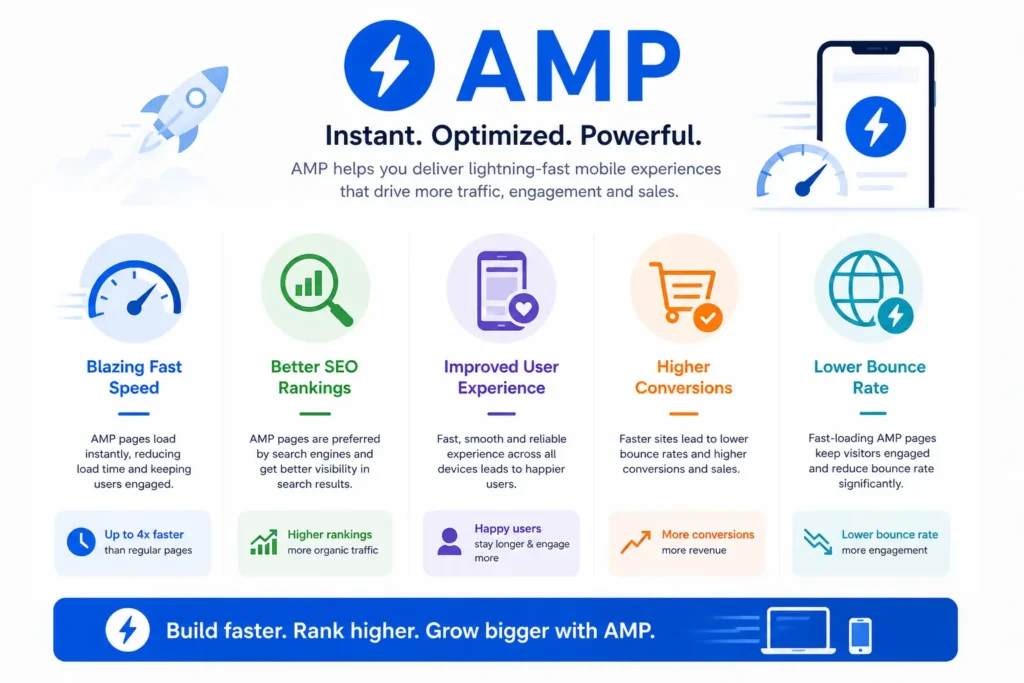
Below are the key benefits that make AMP a valuable addition to any Magento 2 ecommerce website:
Faster Mobile Page Speed for Better Engagement
When users search for products on their smartphones, they expect instant results. They usually click on top listings and move on quickly if a page takes time. AMP for Magento 2 ensures that your pages load almost instantly across devices. Whether someone uses a basic phone or a high-end device, the experience stays smooth and fast. This speed keeps users engaged and reduces the chances of them leaving your store.
Optimised Performance Even on Slow Networks
AMP works as a lightweight layer that simplifies your website structure. It removes heavy elements and focuses on what truly matters. As a result, pages load within seconds, even on slower mobile data connections. This is especially important for Indian users, where network speed can vary. A faster page ensures users can access your store without frustration.
Better Product and Category Page Experience
Product and category pages are the most visited sections of any ecommerce website. If these pages load quickly, users stay longer and explore more. AMP improves these pages by offering a clean layout and smooth navigation. This enhances the overall UI and UX, making it easier for users to browse and make decisions.
Improved Search Visibility and Rankings
Search engines like Google favour fast-loading websites. AMP helps your Magento 2 store meet speed and performance expectations. As a result, your pages can rank higher in mobile search results. This leads to better visibility and increased organic traffic.
Lower Bounce Rates and Higher Retention
Slow websites often push users away. AMP reduces loading time, which keeps users on your site. When pages open quickly, users are more likely to stay, explore products, and interact with your content. This directly lowers bounce rates and improves user retention.
Higher Conversions and Sales Growth
Speed plays a big role in purchase decisions. A fast-loading ecommerce website creates a smooth buying journey. AMP removes delays and friction, helping users move from browsing to checkout easily. This increases the chances of conversions and overall sales growth.
Easy Access to Key Information
AMP allows users to view essential details quickly from search results. Whether it is product information, pricing, or images, everything loads without delay. This improves accessibility and helps users make quicker decisions.
Consistent Performance Across Devices
AMP ensures that your Magento 2 store performs well on all devices. It delivers a consistent experience across smartphones and tablets. This reliability builds trust and encourages users to return to your store.
Ready to Speed Up Your Magento Store?
AMP is just one part of performance optimisation. A well-built Magento store ensures fast loading, smooth navigation, and better conversions.
Additional Benefits of AMP for Magento 2 Stores
Beyond speed, AMP for Magento 2 offers several practical advantages that directly impact your store’s performance and growth.
Higher Search Rankings and Visibility
AMP helps your store meet performance standards set by Google. Faster pages improve your chances of ranking higher in SERPs. This leads to better visibility and more organic traffic.
Smooth Compatibility Across Devices
AMP pages work smoothly on almost all smartphones and tablets. No matter the screen size or device type, users get a consistent experience every time they visit your store.
Reduced Waiting Time for Users
AMP removes unnecessary elements and speeds up page delivery. This cuts down loading time significantly and ensures users can access content without delays.

Increased Traffic and Sales Growth
With better rankings and faster performance, more users reach your store. Faster browsing also encourages users to explore more products, which increases the chances of conversions and sales.
Lower Bounce Rates
Slow websites push users away. AMP keeps pages fast and responsive, which helps retain users and reduces bounce rates.
Improved User Experience
A smooth and quick browsing experience builds trust. Users feel more comfortable navigating your store, which improves engagement and satisfaction.
Stronger Online Presence
Better speed, higher rankings, and improved engagement all contribute to stronger brand visibility. AMP helps your Magento 2 store stand out in a crowded ecommerce market.
How to Create and Implement AMP in Magento 2 (Step-by-Step Guide)
Setting up AMP for Magento 2 is easier today than it was a few years ago. With the right approach, you can quickly build fast loading ecommerce pages and improve overall performance. Below are the most practical ways Magento users create and implement AMP pages.
Two Ways to Create AMP Pages in Magento 2
1. Create AMP Pages on a Separate AMP URL Structure
One of the fastest ways to implement AMP is by creating a dedicated AMP version of your pages. In this method, your existing content is adjusted to meet AMP standards and then served through a separate AMP URL or structure.
This approach works well when using third-party AMP solutions or outsourcing development. It allows you to quickly launch AMP-ready pages without changing your core Magento store setup. Once configured, these AMP pages load instantly across devices and are often cached by Google for even faster delivery.
2. Use Magento 2 AMP Templates or Extensions
Another common method is using ready-made AMP templates or extensions. These solutions come with pre-built AMP layouts for product, category, and CMS pages.
They offer:
- Clean and lightweight page structures
- Basic design frameworks that you can customise
- Flexibility to extend features as per your needs
This approach is faster to implement and ideal for businesses that want quick results without heavy development work.
How AMP Implementation Works in Magento 2
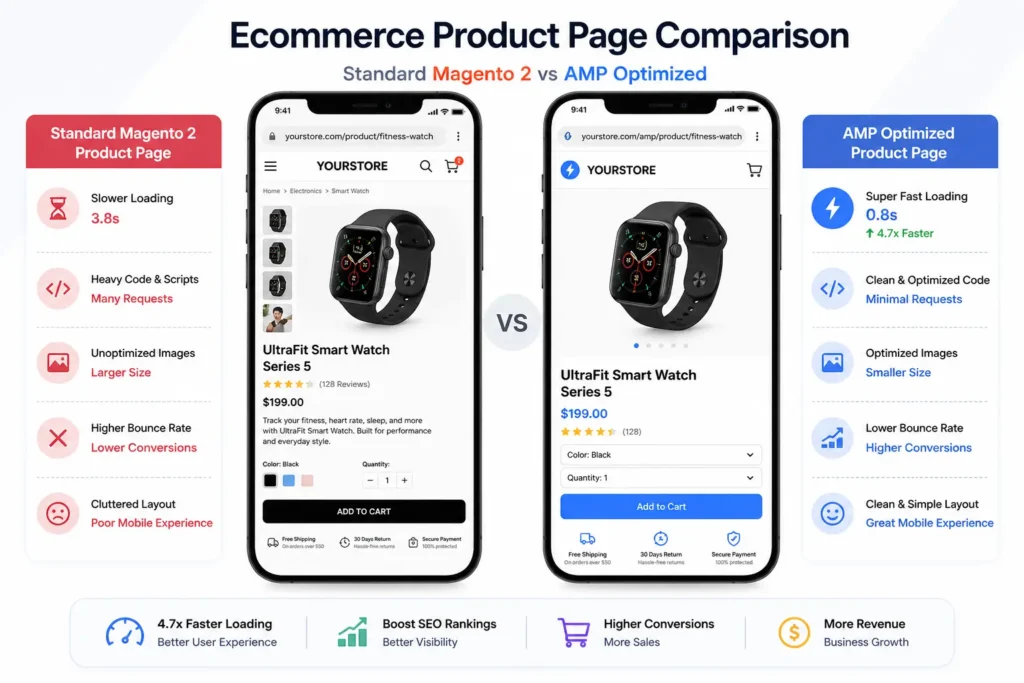
Magento does not support AMP by default. However, you can enable it using dedicated extensions or custom AMP themes. Once installed, the AMP setup creates a parallel mobile-friendly version of your store.
Here is what happens during implementation:
- A separate AMP-optimised mobile theme gets applied
- Pages use simplified HTML with limited CSS and controlled JavaScript
- AMP tags help search engines cache your pages for faster loading
- Your main pages include references that signal AMP availability
After setup, search engines re-index your pages. Once indexed, AMP versions start appearing in mobile search results and load significantly faster than standard pages.
Key Pages Where AMP Delivers Maximum Impact
Not all pages need AMP. Focus on high-traffic and conversion-driven pages:
Product Pages: Product pages drive sales. If they load slowly, users leave. AMP ensures fast loading of images, descriptions, and pricing, which improves conversions.
Category Pages: Category pages help users browse products. Faster loading allows smooth navigation and keeps users engaged.
CMS and Landing Pages: Content-heavy pages also benefit from AMP. Faster loading improves engagement and reduces bounce rates.
Getting Started with AMP in Magento 2
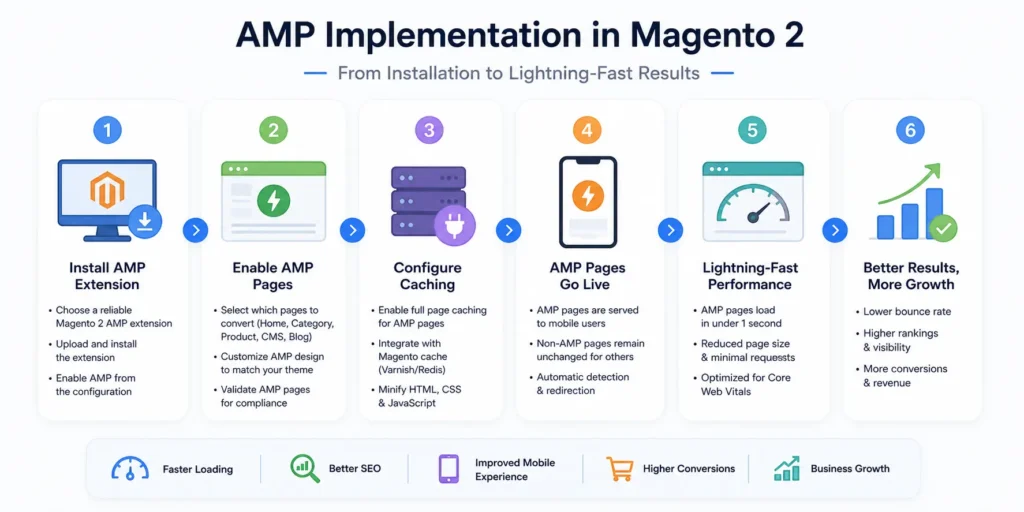
Setting up AMP for Magento 2 is not complex if you follow a clear process. The goal is simple – create fast, mobile-optimised pages that improve user experience and performance. Here is a detailed breakdown of how to get started.
Choose a Reliable Magento 2 AMP Extension
Start by selecting a trusted AMP extension for your Magento 2 store. Since AMP is not available by default in Magento, an extension helps you enable it quickly.
Look for an extension that:
- Supports product, category, and CMS pages.
- Offers regular updates and support.
- Works smoothly with your current Magento version.
- Allows basic customisation without breaking speed.
A good extension will handle most of the technical work and ensure your AMP pages follow the required standards.
Install and Configure the Extension
Once you select the extension, install it on your server. The process usually involves uploading files and running Magento commands to activate the module.
After installation:
- Go to your Magento admin panel.
- Enable the AMP module.
- Configure basic settings like page types and layout.
Most extensions come with a settings panel where you can control how AMP works on your store. Keep the setup simple at first, then refine it later.
Enable AMP for Key Pages
You do not need AMP on every page. Focus on the pages that drive traffic and conversions.
Start with:
- Product pages (most important for sales)
- Category pages (for browsing and navigation)
- CMS pages (for content and SEO)
These pages get the most visits. Making them faster creates a noticeable impact on engagement and conversions.
Customise Design Without Affecting Speed
AMP pages use a simplified design, but that does not mean they should look basic. You can still align them with your brand.
Customise:
- Colours and fonts
- Buttons and call-to-action elements
- Logo and header layout
However, avoid adding heavy design elements. Keep it clean and lightweight. The goal is to maintain speed while offering a consistent brand experience.
Test Your AMP Pages Properly
Testing is a critical step. Even a small error can stop your AMP pages from working correctly.
Check for:
- Valid AMP structure
- Broken elements or missing content
- Page loading speed on mobile devices
You can use tools provided by Google to validate your AMP pages. These tools highlight errors and help you fix them quickly.
Monitor Performance and Improve Continuously
After implementation, do not stop at setup. Track how your AMP pages perform.
Monitor:
- Page load speed
- Bounce rate
- User engagement
- Conversion rates
Use this data to make improvements. Optimise images, remove unnecessary elements, and refine layouts where needed.
Turn Speed Into Sales Growth
A faster Magento store improves rankings, reduces bounce rates, and increases conversions. Investing in performance now helps you stay ahead of competitors.
Conclusion – Why AMP for Magento 2 Still Matters in 2026
Today, digital space, performance and user experience decide success. That is where AMP makes a real impact.
AMP for Magento 2 helps businesses meet modern expectations around speed, mobile usability, and search performance. While AMP is no longer a strict ranking requirement, fast-loading pages are still critical. By improving page speed, reducing bounce rates, and enhancing mobile experience, AMP directly supports better engagement and higher conversions.
Looking ahead, the focus will remain on Core Web Vitals, mobile-first experiences, and seamless user journeys. Businesses that invest in speed optimisation today will be better prepared for future updates and changing user behaviour.
The brands that win are the ones that load fast, respond quickly, and deliver a smooth shopping experience. If you want consistent growth, better rankings, and stronger customer retention, AMP combined with Magento 2 performance optimisation is a smart and future-ready approach.
Ready to Speed Up Your Magento Store?
If your Magento 2 store feels slow or struggles to convert visitors, it is time to act. At IDS Logic, we help businesses build fast, scalable, and high-performing ecommerce solutions tailored for real growth.
From AMP implementation and Magento 2 performance optimisation to complete store development, our team focuses on what matters – speed, user experience, and conversions.
Let’s turn your Magento store into a fast, conversion-driven platform that delivers real results.
Frequently Asked Questions
Q1. Is AMP still useful for Magento 2 in 2026?
AMP continues to be relevant, especially for ecommerce stores that receive a large share of mobile traffic. While AMP is no longer a direct ranking requirement, page speed and user experience remain critical factors for SEO. AMP helps Magento 2 stores deliver faster loading pages, which improves engagement, reduces bounce rates, and supports better visibility on search engines like Google. For businesses aiming to improve mobile performance, AMP still offers clear advantages.
Q2. Which Magento 2 pages benefit the most from AMP?
AMP delivers the best results on high-traffic and conversion-focused pages. Product pages, category pages, and landing pages are the most important areas to optimise. These pages directly influence user decisions. When they load quickly, users are more likely to stay, browse products, and complete purchases. Applying AMP to these sections helps create a smoother shopping journey and reduces drop-offs.
Q3. Will AMP affect the design of a Magento 2 store?
AMP uses a simplified structure to improve speed, so the design may appear slightly different from the main website. However, most Magento 2 AMP extensions allow customisation of colours, fonts, buttons, and layout elements. This ensures that branding remains consistent while still maintaining a lightweight and fast-loading design. The focus remains on balancing visual appeal with performance.
Q4. Can AMP improve Core Web Vitals and SEO performance?
AMP can positively impact Core Web Vitals by improving loading speed, reducing layout shifts, and enhancing responsiveness. Metrics such as Largest Contentful Paint (LCP) and Interaction to Next Paint (INP) benefit from AMP’s lightweight structure. Better Core Web Vitals scores contribute to improved search rankings and overall user experience. Faster pages also encourage longer session durations and higher engagement.
Q5. Is AMP compatible with third-party Magento extensions?
AMP has certain restrictions because it limits heavy scripts and complex functionalities. As a result, not all third-party extensions work directly with AMP pages. However, many AMP solutions provide built-in alternatives or partial compatibility for essential features. With the right configuration, most core ecommerce functionalities can still be maintained without compromising speed.
Q6. Can user behaviour and conversions be tracked on AMP pages?
Yes, AMP pages support analytics tracking. Tools like Google Analytics can be integrated to monitor user behaviour, traffic sources, and conversion rates. This allows businesses to measure performance and identify areas for improvement. Proper tracking ensures that AMP pages contribute effectively to overall business goals.
Q7. Do AMP pages support key ecommerce features like Add to Cart and checkout?
Modern AMP implementations support essential ecommerce features, including Add to Cart, product options, and basic checkout flows. However, highly customised or complex functionalities may require adjustments to work within AMP guidelines. The goal is to retain important features while keeping pages fast and responsive. When implemented correctly, AMP can support a smooth and efficient buying experience.