A Useful Guide to the Magento Security Patches
Magento websites are a critical part of a business since they handle sensitive customer data, payments, and daily operations. As such Magento website security is a must-have for today’s Magento stores.
Security threats for eCommerce are on the rise. Recent incidents have demonstrated the rapid threat level of unpatched stores. Attackers gain access to unpatched stores in days, resulting in data theft, payment breaches, and major business losses.
This is where Magento security patches play a key role. Security patches are regular Magento security updates released to fix vulnerabilities and strengthen your store’s protection. Without timely updates, even a small loophole can expose your entire system.
Many store owners still delay updates due to fear of breaking their website. However, ignoring Magento vulnerability fixes can cost far more than fixing them. With proper Magento support and maintenance, you can apply patches safely without affecting performance. This keeps your store secure, stable, and ready for growth.
In this guide, we will explain what Magento security patches are, why they are essential, and how you can manage them effectively to protect your business.
What Are Magento Security Patches and Why They Matter in 2026?
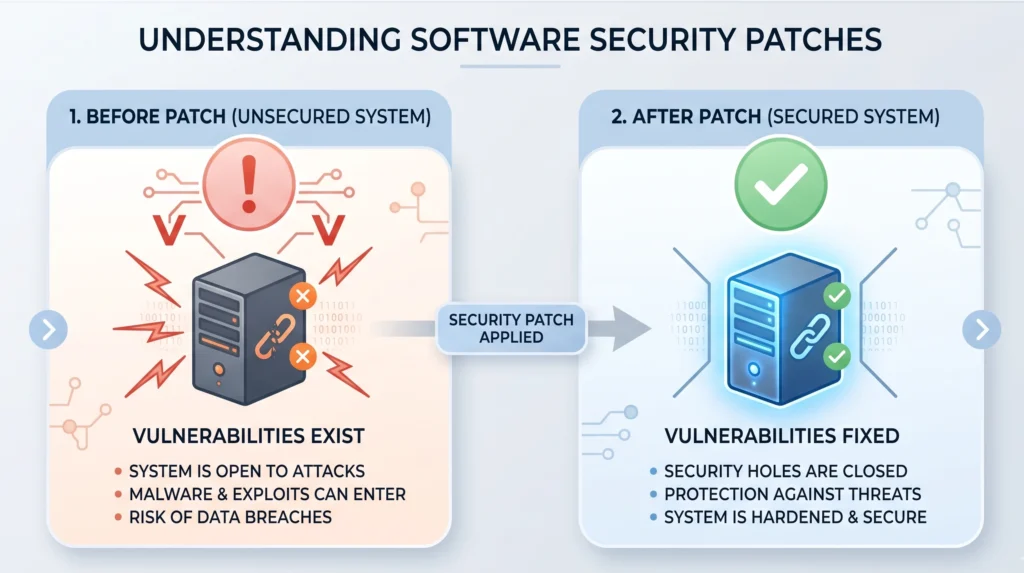
Magento security patches are essential updates released to fix vulnerabilities and protect your store from threats. Think of them as quick fixes that close security gaps without affecting your store’s daily operations. Your products, checkout, and user experience continue to work as usual. However, the security risk gets removed.
In today’s environment, where cyber threats evolve rapidly, applying regular Magento security updates is critical. Even a small delay can expose your store to attacks.
Types of Magento Security Patches You Should Know
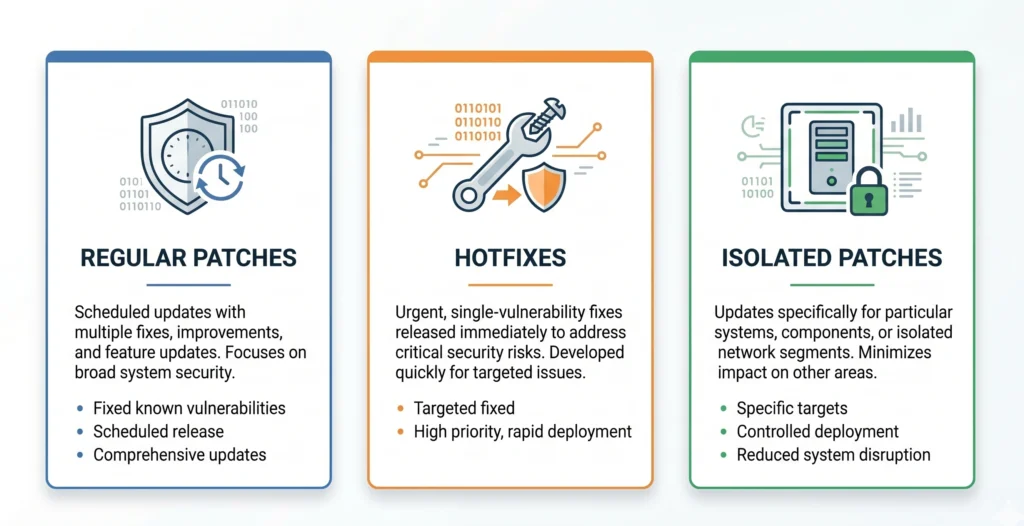
Not all patches are the same. Understanding the different types helps you respond faster and more effectively. With proper Magento support and maintenance, you can manage all these patch types without disrupting your store.
Regular Security Patches
These are planned updates released multiple times a year. They fix several vulnerabilities at once and improve overall Magento website security.
Hotfixes (Emergency Patches)
These are urgent updates. They are released when a serious vulnerability is discovered or actively exploited. These patches require immediate action.
Isolated Patches
These patches target a specific issue or vulnerability. They are useful when you want to fix a problem without updating the entire system.
Supported Magento Versions in 2026
Keeping your Magento version updated is just as important as applying patches. As of 2026, Adobe continues to support the latest Magento versions, including recent releases in the 2.4.x range for both Adobe Commerce and Magento Open Source.
Adobe typically releases multiple Magento security patch updates throughout the year. These updates follow a regular schedule, along with additional emergency fixes when needed.
If your store is running on an outdated version, it becomes more vulnerable. Regular updates ensure you receive the latest Magento vulnerability fixes and security improvements.
To stay updated with the latest platform improvements and upcoming releases, you can also check our detailed guide on Magento 2.4.9 beta features and updates.
Why Timely Magento Security Patch Updates Are Critical for Your Store?
Cyber threats are getting faster, smarter, and more targeted than ever before, requiring constant attention to Magento stores. In 2026, cyber threats have become even faster, smarter, and more targeted.
If you delay Magento security patches, your store becomes vulnerable within days. Hackers actively scan for outdated systems and exploit known weaknesses quickly. This makes regular Magento security updates a business necessity, not just a technical task.
Installing patches on time protects your data, customers, and revenue. It also ensures your store runs smoothly without unexpected risks.
Hackers Target Known Vulnerabilities First
Cybercriminals no longer guess their way into systems. They use known vulnerabilities that already exist in outdated versions. The moment a new flaw becomes public, attackers start exploiting it. Many stores get compromised simply because they missed a recent Magento security patch update.
Common attack methods include:
- Data extraction through database manipulation
- Injecting harmful scripts into web pages
- Gaining full access to servers
With regular Magento vulnerability fixes, you close these gaps before attackers can use them.
Data Breaches Can Break Customer Trust
A single breach can damage your brand permanently. When hackers access your store, they can steal customer data, payment details, and login credentials. This not only affects your operations but also breaks customer trust.
Studies show that many customers stop buying from brands after a security breach. This leads to long-term revenue loss. By applying Magento security patches on time, you reduce the risk of such incidents and keep your customers safe.
Compliance Requirements Make Updates Mandatory
Security is not just about protection. It is also about compliance. If your store processes payments, you must follow standards like PCI DSS. If you handle customer data, you must follow data protection laws.
These regulations require regular system updates and proper security practices. Ignoring Magento website security can result in penalties, fines, or even suspension of payment processing services.
Performance and Stability Improve with Updates
Security patches do more than fix issues. With proper Magento support and maintenance, these updates help your store run faster and more efficiently. This improves both user experience and search engine rankings.
They often improve:
- Website performance
- System stability
- Compatibility with new technologies
Delaying Updates Increases Long-Term Risk
Many businesses delay updates because they fear downtime or technical issues. However, this delay creates bigger problems. The longer your store remains unpatched, the higher the risk of attack. Fixing a compromised store takes more time, effort, and cost than applying updates. With expert Magento support and maintenance, patches can be applied safely without affecting your store’s performance.
How to Check and Prepare Your Magento Store Before Installing Security Patches?
Before you install any Magento security patch, you need to understand your current setup and risks. Many businesses skip this step and face issues later. A structured approach helps you avoid downtime, data loss, and compatibility problems. It also ensures your Magento support and maintenance process runs smoothly.
Check Your Current Magento Version First
You should start by identifying your exact Magento version. This step is essential because every patch is version-specific. You can check it directly from your admin panel footer or through command-line access. Once you know your version, you can apply the correct update without causing conflicts. This also helps you plan future upgrades and maintain a stable store environment.
Identify Early Warning Signs of Security Issues
If your store has not been updated regularly, it may already be exposed to risks. You should look for warning signs such as unknown admin users, suspicious files, unusual traffic activity, or sudden performance drops. These issues often indicate deeper problems like malware or unauthorized access. Detecting these signs early allows you to take action before the situation becomes critical.
Use Security Tools for a Quick Health Check
Manual checks are not always enough. You should also use reliable tools to scan your store and identify hidden vulnerabilities. Automated Magento security scan tools, third-party scanners, and professional audits can help uncover threats that are not visible at first glance. Regular scanning strengthens your overall Magento store security and reduces the chances of unexpected breaches.
Create Complete Backups Before Any Update
Before applying any Magento security patch, always create a complete backup of your store. This includes your database, which contains products, orders, and customer data, as well as all files such as themes, extensions, and core code. A proper backup ensures that you can quickly restore your store if something goes wrong. Skipping this step can lead to permanent data loss and longer downtime.
Check System Requirements and Compatibility
Every Magento update comes with specific technical requirements. You need to ensure that your PHP version, database setup, and server environment are compatible with the patch. In addition, your installed extensions and custom themes should support the new update. Ignoring these checks can cause errors after installation and disrupt your store’s functionality.
Test Updates in a Staging Environment
Applying updates directly to a live store is risky. Instead, you should test everything in a staging environment that mirrors your actual setup. This allows you to check the full user journey, including browsing, checkout, and backend operations. It also helps you identify and fix issues before they affect your customers.
Plan Updates to Avoid Business Disruption
Finally, timing plays a key role in successful patch installation. You should schedule updates during low-traffic hours to minimize impact on customers. It is also important to enable maintenance mode during the process to avoid transaction errors. A well-planned update ensures minimal downtime, protects customer experience, and keeps your business running smoothly.
How to Install Magento Security Patches Safely?
Applying a Magento security patch is not something you should handle casually. It needs a structured and reliable approach to avoid errors or downtime. Today, most businesses follow a standardized method that ensures smooth updates, better compatibility, and long-term stability for their Magento store.
Composer is the standard tool used for managing Magento updates. It handles dependencies, checks compatibility, and applies updates in a structured way. Unlike manual methods, Composer reduces the chances of breaking your store. It also ensures that your Magento maintenance and security updates stay consistent over time.
Step-by-Step Process to Apply Magento Security Patch Using Composer
Connect to Your Server and Access Magento Root
To begin, you need server access and a properly configured Magento setup. Once ready, the process starts by connecting to your server and navigating to your Magento root directory.
Update Composer Dependencies for Compatibility
Next, you update your Composer dependencies to ensure compatibility with the latest Magento updates. This step helps prevent conflicts during installation and prepares your environment for a smooth update.
Select and Install the Required Magento Version
After that, you select the correct Magento version that includes the required security patch. Composer then downloads and installs the update while managing all dependencies in the background.
Enable Maintenance Mode Before Applying Changes
Before applying changes, you should enable maintenance mode. This prevents users from interacting with your store during the update and avoids transaction issues.
Run System Upgrade and Deploy Updates
Once the files are updated, Magento requires a system upgrade. This step updates your database structure and ensures everything works with the new patch. After that, code compilation and static content deployment are performed to improve performance and ensure the frontend works correctly.
Clear Cache to Reflect Changes
The next step is clearing the cache. This ensures your store reflects the latest changes without loading outdated data.
Disable Maintenance Mode and Test Your Store
Once your store is back online, you will disable maintenance mode and put it back into production mode. During this stage, you should test critical areas such as product browsing, checkout, and admin functions to ensure everything is working as expected.
Keep Your Magento Store Secure Without Downtime
Security updates can be complex and risky without the right process. Let experts handle patch installation, testing, and monitoring so your store stays safe and stable.

Why Magento Support & Maintenance Services Are Essential for Security Patch Management
Keeping your Magento store secure is not a one-time task. It requires continuous monitoring, timely updates, and technical expertise.
Today security threats evolve quickly. A small delay in applying a Magento security patch can expose your store to serious risks. This is why businesses rely on professional Magento support and maintenance services.
With the right team, you can ensure your store stays secure, updated, and fully operational without disruption.
Continuous Monitoring Helps Detect Risks Early
Security issues rarely appear without warning. Most compromised stores show early signs that often go unnoticed.
A professional Magento maintenance service actively monitors your store for:
- Unusual admin activity
- Suspicious files or scripts
- Unexpected traffic spikes or server behavior
Early detection allows quick action before the issue grows into a major breach.
Without expert monitoring, these warning signs can easily be missed, leading to costly damage.
Safe and Structured Patch Installation Process
Installing Magento security patches is not just about updating files. It requires a structured approach to avoid errors.
Experienced teams follow a proper process that includes:
- Checking your current Magento version
- Testing patches in a staging environment
- Taking complete backups before updates
- Applying updates without affecting live operations
This ensures your store remains stable while improving security.
Trying to apply patches without this process can break your website or cause downtime.
Compatibility and Performance Are Handled Professionally
One of the biggest challenges during updates is compatibility.
Your store may use custom themes, extensions, and integrations. A simple patch can create conflicts if not handled correctly.
With expert Magento support services, teams:
- Check extension compatibility before updates
- Resolve conflicts during patch installation
- Optimize performance after updates
This keeps your store fast, stable, and fully functional.
Reduced Downtime and Business Risk
Every minute your store is down, you lose potential revenue.
Professional teams plan updates during low-traffic hours. They also use maintenance mode and proper testing to reduce risks.
As a result:
- Customers face minimal disruption
- Transactions remain safe
- Your brand reputation stays intact
This level of control is difficult to achieve without expert support.
Ongoing Maintenance Keeps Your Store Future-Ready
Security is not a one-time fix. It is an ongoing process.
With reliable Magento support and maintenance, your store benefits from:
- Regular updates and security checks
- Performance improvements
- Continuous monitoring and reporting
This proactive approach helps you stay ahead of threats instead of reacting after damage occurs.
Hiring a Magento support and maintenance service is not just about fixing issues. It is about preventing them, protecting your business, and ensuring long-term growth without interruptions.
If your store is already showing performance or security issues, it may be worth reviewing these early warning signs. You can explore this in detail in our guide on 7 signs you need Magento consulting services.
Struggling with Magento Security Updates?
Don’t wait for a security breach to act. Our Magento experts ensure timely patch updates, performance checks, and complete store protection.

Final Thoughts – Keep Your Magento Store Secure and Future-Ready
Magento security is not something you can delay or ignore. Today, cyber threats are faster, smarter, and more targeted than ever. A missed Magento security patch can expose your store to serious risks, including data breaches, downtime, and loss of customer trust.
The reality is simple. Security is not a one-time task. It is an ongoing process that requires regular updates, monitoring, and proactive action. When you apply Magento security patches on time, you protect your store, your customers, and your business reputation.
However, just installing patches is not enough. A strong Magento maintenance strategy also includes performance checks, system monitoring, and continuous improvement. This ensures your store stays stable, secure, and ready to scale.
If you are unsure about managing updates or handling security risks, working with Professional Magento development services can help you manage patch updates, reduce risks, improve performance, and ensure long-term security without disruption.
Secure Your Magento Store with IDS Logic
Keeping your Magento store secure should not feel overwhelming. With the right support, it becomes a smooth and reliable process.
At IDS Logic, our experienced team of Magento experts helps businesses stay protected with complete Magento support and maintenance services. From timely patch updates to continuous monitoring, we ensure your store remains secure and performs at its best.
What You Get with IDS Logic:
- Timely Magento security patch installation
- Complete security audits and risk analysis
- Ongoing Magento maintenance and performance optimisation
- Quick issue resolution and proactive monitoring
Ready to protect your Magento store and avoid costly risks?
Get in touch with IDS Logic today and secure your eCommerce business with confidence.
Frequently Asked Questions
Q1. What are Magento security patches?
Magento security patches are updates released by Adobe to fix known vulnerabilities and strengthen store protection. These updates help safeguard your website from threats like data breaches, malware injections, and payment-related risks. Applying them regularly is essential to maintain a secure and stable Magento store.
Q2. How often should we install Magento security patches?
You should install Magento security patches as soon as they are released. Adobe usually follows a regular release cycle, but critical vulnerabilities may require immediate updates. Delaying updates increases risk, so it is best to follow a consistent Magento maintenance schedule and monitor new releases closely.
Q3. Is it safe to install Magento security patches on a live site?
Installing patches directly on a live site is not recommended. It is always safer to test updates in a staging environment first. This allows you to identify compatibility issues and fix them before going live. A planned approach reduces downtime and ensures a smooth update process.
Q4. What is the best way to install Magento 2 security patches?
The most reliable method is using Composer. It ensures proper dependency management, reduces conflicts, and aligns with Magento’s recommended practices. Most professional Magento development services use this approach for safe and efficient patch installation.
Q5. What happens if we don’t install Magento security patches?
Ignoring Magento security patches can expose your store to serious risks. Hackers often target outdated systems, which can lead to data theft, financial loss, and damage to your brand reputation. In some cases, it may also impact compliance with security standards.
Q6. Do Magento security patches affect website performance?
In most cases, security patches improve overall performance and stability. Some updates include optimizations that make your store faster and more efficient. However, improper installation or compatibility issues can affect performance, which is why testing is important.
Q7. Can Magento security patches break extensions or custom features?
In some cases patches may conflict with outdated extensions or custom code. This is why it is important to check compatibility before applying updates. Working with experienced Magento experts ensures that any conflicts are identified and resolved quickly without affecting your store functionality.