
Top 10 SharePoint Migration Tools to Consider (Expert Guide-2026)
SharePoint, owned by Microsoft, continues to be one of the most reliable platforms for collaboration and content management. Its flexibility, paired with powerful SharePoint migration services, has made it an essential tool for businesses aiming to boost productivity.
In today’s fast-paced digital world, organisations generate and manage more data than ever before. To keep up, many companies upgrade to a newer version of SharePoint migration tools or move to cloud-based solutions like Microsoft 365. This ensures scalability, improved accessibility, and smarter data management.
In this blog, we’ll explore the best SharePoint migration tools, compare their features, and help you understand which option fits your business needs. Whether you’re an IT professional or someone new to data migration, consider this your go-to reference. We’ll cover how these tools work, what challenges you may face, and how to choose wisely.
Our SharePoint migration experts have evaluated a wide SharePoint migration tools list, including well-known options like the Metalogix SharePoint migration tool, and created a clear SharePoint migration tools comparison. By the end of this article, you’ll know which tool or service provider can make your transition smooth, secure, and future-ready.
So, let’s dive into the top SharePoint migration tools you should consider.
What is SharePoint Migration?
Think of a SharePoint migration as moving your digital assets, data, files, content, and workflows, from one SharePoint environment to another. This could mean upgrading to a newer version, shifting to SharePoint Online, or transitioning to a cloud-based setup.
The main objective of any SharePoint migration service is to make this transition smooth, secure, and reliable. Your information must remain accessible, properly structured, and fully functional after the move.
When you start planning a migration, strategy is key. A well-defined approach usually involves:
- Assessing your current SharePoint environment with a SharePoint migration assessment tool.
- Choosing the right SharePoint migration tool that fits your business goals.
- Executing the move carefully while maintaining data integrity.
- Performing checks and validations to confirm that everything works as expected.
What is a SharePoint Migration Tool and Why Do You Need It?
A SharePoint migration tool is a software solution that helps businesses copy, move, and upgrade their SharePoint content. These tools ensure that files, libraries, metadata, and permissions transfer seamlessly without disruption.
While Microsoft offers its own SharePoint Migration Tool (SPMT) for Office 365 users, the market now has a wide SharePoint migration tools list with more advanced features. Popular options like the Metalogix SharePoint migration tool, ShareGate, and AvePoint provide deeper functionality, better reporting, and support for complex migrations.
Choosing the right tool requires careful SharePoint migration tools comparison. You should evaluate factors like scalability, security, reporting, and compatibility with your existing setup. This ensures you pick the best option for your business.
Whether you work with in-house teams or partner with SharePoint migration service providers, a well-chosen tool reduces downtime, protects data, and helps you leverage Microsoft’s latest SharePoint capabilities.
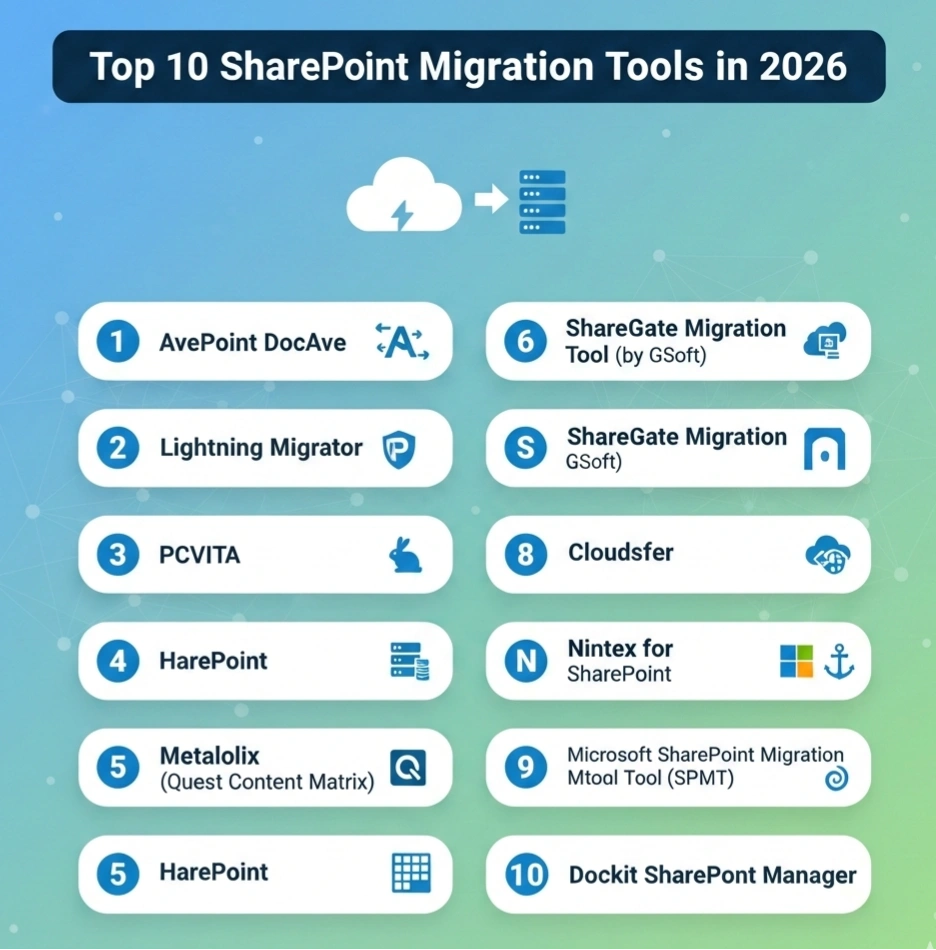
Top 10 SharePoint Migration Tools in 2026
Migrating SharePoint environments requires the right balance of speed, security, and scalability. Below is a SharePoint migration tools comparison that highlights the most trusted and widely used solutions. These are often recommended by SharePoint migration service providers and IT leaders when planning large or complex projects.
1) AvePoint DocAve
AvePoint DocAve stands out as a robust SharePoint online migration tool, crafted to streamline the transition from older systems to the latest SharePoint or Microsoft 365 versions. Its advanced features and user-friendly interface make transferring large datasets smooth and efficient. This ensures zero data loss and minimal downtime during the migration process. It remains a go-to solution for organisations looking for enterprise-grade migration.
Key Features:
- Central command and control for hybrid environments.
- Built to scale, supporting enterprise-grade migrations and continuity of business operations.
- Flexible hosting on local servers or cloud environments.
- Expandable architecture to meet evolving business requirements.
Pricing:
Starting at $499/month, with customised enterprise packages available.
2) Lightning Migrator
Lightning Migrator is an advanced SharePoint data migration tool tailored for both large-scale and enterprise-level migrations. It offers high-performance capabilities, enabling swift and secure migration of billions of files simultaneously. With pre-migration scanning, automated permission mapping, and incremental migration features, Lightning Migrator helps enterprises meet compliance goals while reducing downtime.
Key Features:
- Comprehensive security features aligned with industry standards.
- Maintains compliance for regulated industries.
- Best suited for healthcare, banking, and financial services migrations.
- Reduces downtime during large-scale migrations.
Pricing:
Available on request.
3) PCVITA
PCVITA has earned trust as a reliable SharePoint migration tool for enterprises seeking seamless migration and integration. It supports bulk data transfers efficiently and ensures smooth migration without downtime. Its advanced reporting and analytics provide full transparency for IT teams during the migration process.
Key Features:
- Bulk data migration with high performance.
- Advanced reporting features for tracking and insights.
- Detailed business and migration process analytics.
- Simple deployment for IT teams and administrators.
Pricing:
One-time license fee starting at $49.
4) HarePoint
HarePoint is an effective solution for organisations migrating from on-premises SharePoint to SharePoint Online. It ensures data integrity throughout the migration journey while minimising duplication risks. With HarePoint, businesses can schedule migrations, monitor progress, and simplify complex mapping needs.
Key Features:
- Advanced data mapping and migration features.
- In-depth analytics and reporting for IT teams.
- Automated scheduling options for hassle-free migration.
- Pre-built models for streamlining multiple migration tasks.
Pricing:
Available on request.
5) Metalogix (Quest Content Matrix)
Metalogix, now part of Quest Software, continues to be one of the best SharePoint migration tools 2026. Recognised for its ability to manage complex, enterprise-scale migrations, it offers a comprehensive suite of solutions for planning, execution, and post-migration support. It supports migration from multiple sources, including file systems, legacy platforms, and Exchange Public Folders.
Key Features:
- Handles large-scale and complex SharePoint migrations seamlessly.
- Maintains metadata, content structure, and permissions.
- Advanced scheduling and migration planning options.
- Real-time monitoring and reporting during the migration process.
Pricing:
Starting from $2,999.
6) ShareGate Migration Tool (by GSoft)
ShareGate by GSoft is one of the most popular solutions in SharePoint migration tools comparison. Known for its simplicity and powerful automation, it helps businesses migrate from on-premises SharePoint to SharePoint Online and Microsoft 365 efficiently.
Key Features:
- Easy-to-use interface with minimal learning curve.
- Robust auditing and reporting features.
- Pre-migration analysis for informed planning.
- Scheduling and automation for large projects.
Pricing:
Available on request.
7) Cloudsfer
Cloudsfer is a cloud-based SharePoint online migration tool designed to support multi-environment data transfers. It facilitates migration across on-premises and cloud systems while integrating with over 20 leading storage providers such as Google Drive, Dropbox, and OneDrive.
Key Features:
- Multi-user and multi-data migration capabilities.
- Flexible and scalable for small to enterprise projects.
- Accurate metadata and permission mapping.
- Supports cloud-to-cloud as well as on-premises-to-cloud transfers.
Pricing:
Starts at $25/month; Pro plan $250/month.
8) Nintex for SharePoint
Nintex is widely used for SharePoint CMS solutions and workflow automation. While not solely a migration tool, it enhances migration projects by automating business processes, optimising governance, and improving the post-migration SharePoint experience.
Key Features:
- Drag-and-drop workflow creation.
- Business process automation for SharePoint CMS solutions.
- Optimises migration performance and governance.
Pricing:
From $625/month.
9) Microsoft SharePoint Migration Tool (SPMT)
Developed by Microsoft, this free tool is perfect for smaller projects or organisations just starting their move to the cloud.
Key Features:
- Free-to-use for Microsoft 365 users.
- Performs basic content migration securely.
- Simple setup for small to mid-sized businesses.
- Direct integration with Microsoft 365 ecosystem.
Pricing:
Free.
10) Dockit SharePoint Manager
Dockit SharePoint Manager is a feature-rich solution for SharePoint data migration. It supports document-heavy projects and industries with strict compliance requirements by offering advanced content tagging and workflow features.
Key Features:
- One-click metadata tagging for bulk documents.
- Time and expense tracking for project teams.
- Advanced workflow and project management tools.
- Flexible scheduling for complex migrations.
Pricing:
Available on request.
Factors to Consider Before Choosing a SharePoint Migration Tool
Now that we have covered the top ten SharePoint migration tools, let’s have a look at their importance and key considerations before choosing the right tool for your business.
Why Use SharePoint Migration Tools?
A SharePoint migration tool leverages advanced collaboration capabilities, efficient content management benefits, and seamless integration with other Microsoft 365 applications. This empowers teams to work more cohesively, make informed decisions, and adapt quickly to the changes that today’s dynamic digital landscape demands.
Before we start our discussion on various SharePoint data migration tools, we will provide in-depth insight into what to look for when choosing the right migration solution, the features, and the benefits of a Microsoft SharePoint migration tool.
Added to that, this article briefs the 10 best SharePoint online migration tools. This will provide clarity on their features, pricing, and limitations, helping you decide the best one for your business requirements.
What to Look for When Choosing the Right Migration Tool?
Robust data security
During migration, it’s crucial to prioritise data security. Businesses should opt for migration tools for SharePoint that offer strong encryption and compliance with security standards. The tool must also provide additional measures to protect sensitive data. This approach minimises the risk of breaches, ensuring data remains confidential throughout the migration process. Choosing tools with robust security features allows businesses to migrate to SharePoint with maximum trust.
Intuitive user interface
An intuitive interface ensures effortless navigation while using a SharePoint migration tool. A clean, user-friendly design makes it easier to understand and operate the tool. A well-designed SharePoint online migration tool streamlines the process, reduces the learning curve, and enables users to effectively transfer their data without hurdles.
Data compatibility
Businesses manage diverse data types, including documents, images, videos, and audio files. When choosing a tool, it’s vital to ensure it doesn’t come with SharePoint migration tool limitations. Select one that supports migrating multiple file formats and ensures compatibility across systems and versions. This guarantees accurate and complete migration of all data to SharePoint, regardless of its complexity.
Advanced data mapping
Advanced data mapping enables mapping the source data structure to the right destination within SharePoint. This feature is essential for successful SharePoint data migration. It ensures data is properly organised in the target environment, avoiding confusion and misplacement. With this functionality, businesses can streamline processes and maintain data integrity during migration.
Seamless data transfer
A Microsoft SharePoint migration tool should securely transfer data between environments without loss, duplication, or disruption. Selecting a dependable, robust solution is essential to ensure smooth, error-free migration. With the right tool, businesses can minimize risks and guarantee a seamless transition.
Benefits of SharePoint Migration Tools
SharePoint migration tools come with a number of benefits when businesses choose the right tool from the right stack. Here is a brief on some of the most important advantages.
Versatile
SharePoint data migration tools provide a broad array of capabilities. This versatility makes them adaptable to different data types and environments. They can manage diverse file formats, databases, and platforms, simplifying the migration process for businesses. With the right SharePoint online migration tool, organisations can ensure seamless transitions without worrying about compatibility or common SharePoint migration tool limitations.
Efficiency
When using a Microsoft SharePoint migration tool, efficiency is one of the biggest advantages. These tools streamline the transfer of data, often with built-in automation for data mapping. This reduces manual effort, saves valuable time, and accelerates migration. As a result, businesses benefit from higher productivity and smoother operations during large-scale moves.
Affordable
Compared to manual processes, a SharePoint migration tool is always more cost-effective. Businesses with complex data sets can rely on these tools to minimise labour-intensive tasks and reduce overall costs. By automating key steps, the tools eliminate unnecessary expenses while ensuring that migration stays efficient and budget-friendly.
Automation
Modern SharePoint migration tools come equipped with automated capabilities. They streamline business processes, reduce repetitive manual tasks, and minimise the chances of errors. With features like scheduling, auto-mapping, and reporting, a robust SharePoint online migration tool ensures faster, more reliable migrations with less effort from IT teams.
How IDS Logic Can Help You with SharePoint Migration Services?
IDS Logic is a trusted technology partner that delivers a wide range of Microsoft development solutions. Our team of SharePoint migration experts is committed to offering end-to-end SharePoint migration services, ensuring secure, efficient, and future-ready solutions for businesses of all sizes.
Detailed Analysis
Before initiating any migration, we perform a thorough project analysis. As a leading SharePoint migration company, we focus on understanding unique business needs, identifying potential challenges, and recommending the right SharePoint migration tool, whether it’s the Microsoft SharePoint migration tool, a third-party SharePoint data migration tool, or a SharePoint online migration tool.
Customization
Our customisation services are an integral part of every migration project. We work closely with businesses to understand requirements and deliver fully tailored SharePoint migration services. This ensures a smooth transition without the common SharePoint migration tool limitations.
User-Centric Services
We design intuitive and user-friendly interfaces so that employees and stakeholders can seamlessly adopt the new environment. With expertise in SharePoint CMS solutions and SharePoint migration tools, we ensure that migrated websites and intranet systems deliver an engaging and efficient user experience.
Ongoing Support
Our responsibility doesn’t end once the migration is complete. At IDS Logic, we offer dedicated SharePoint Support & Maintenance services to ensure your environment remains secure, optimised, and aligned with your evolving business goals. From proactive performance monitoring to issue resolution and ongoing enhancements, our experts provide continuous support that keeps your SharePoint platform running smoothly long after deployment.
Conclusion
The success of any SharePoint migration largely depends on two factors — selecting the right SharePoint migration tool and partnering with the right SharePoint migration company. With a variety of options available, from the Microsoft SharePoint Migration Tool to advanced SharePoint online migration tools, businesses must carefully evaluate which solution aligns best with their requirements.
Choosing wisely ensures that your data, workflows, and content are migrated securely, without disruption or loss. Beyond just the tool, working with experienced SharePoint migration experts can make all the difference. A trusted partner brings technical expertise, proven processes, and ongoing support, helping you overcome potential SharePoint migration tool limitations while achieving a seamless transition.
At IDS Logic, our team provides comprehensive SharePoint migration services that cover planning, execution, and post-migration support. Whether it’s moving from on-premise to cloud or handling a SharePoint to SharePoint migration, we ensure that your environment is modernised, secure, and ready to support future growth.
If you’re looking to simplify your migration journey and unlock the full potential of SharePoint, Connect with our experts today.
Frequently Asked Questions
Q1. How do we choose between a free Microsoft SharePoint migration tool and a paid third-party solution?
The Microsoft SharePoint Migration Tool is great for small projects with basic requirements. However, for large enterprises, third-party SharePoint online migration tools like ShareGate or Metalogix provide advanced features such as automation, reporting, and real-time monitoring. Your choice depends on project complexity, compliance needs, and scalability.
Q2. Can SharePoint migration tools handle hybrid or multi-cloud environments?
Yes. Modern SharePoint migration tools are built to support hybrid environments, enabling migration from on-premises SharePoint to the cloud, or even between multiple cloud providers. Many advanced solutions also support SharePoint to SharePoint migration tools, making them ideal for businesses adopting hybrid workplace strategies.
Q3. How long does a typical SharePoint migration project take?
Timelines vary depending on the data size, complexity, and chosen SharePoint migration company. Small migrations may take a few days, while enterprise-level projects can span weeks or months. Partnering with experienced SharePoint migration experts ensures efficient planning and execution, reducing downtime.
Q4. What risks are involved in SharePoint migration, and how can they be minimised?
Risks include data loss, downtime, permission mismatches, or failed migrations. Using a trusted SharePoint migration tool with strong security features, combined with professional SharePoint migration services, helps mitigate these risks. Pre-migration assessments and pilot testing are key safeguards.
Q5. How do SharePoint migration experts add value beyond the tools themselves?
While tools manage the technical transfer, SharePoint migration experts provide strategy, governance, and training. A skilled SharePoint migration company ensures that data is not only moved but also restructured, secured, and optimized for long-term business productivity.