Adobe Commerce Cloud Migration: The Ultimate Guide 2026
Businesses are facing rapid changes in the ecommerce industry, and to remain competitive, they need fast, scalable, and future-ready platforms. As customer expectations increase, businesses must modernize their ecommerce infrastructure to accommodate speed, personalization, mobile shopping, and smooth buying experiences.
Adobe Commerce Cloud has become a preferred choice for businesses looking to improve performance, scalability, security, and operational efficiency. Backed by Adobe Experience Cloud, the platform helps businesses manage complex ecommerce operations across web, mobile, marketplaces, and global channels more effectively.
Adobe Commerce migration is no longer only about moving from Magento 1 to Magento 2. Businesses are now focusing on complete ecommerce modernization, including cloud migration, headless commerce adoption, AI-powered customer experiences, platform upgrades, and composable commerce strategies.
Today, Adobe Commerce as a Cloud Service also offers fully managed infrastructure, simplified maintenance, stronger security, better scalability, and faster deployment cycles. This allows businesses to focus more on growth, customer experience, and digital innovation instead of managing operational complexities.
However, a successful Adobe Commerce Cloud migration requires proper planning. Businesses must carefully evaluate their product catalogs, integrations, customer data, SEO structure, extensions, workflows, and infrastructure before migration begins.
In this blog, we will explain Adobe Commerce Cloud migration in detail, including its business benefits, migration process, modernization strategies, challenges, and best practices for building a scalable ecommerce platform in 2026 and beyond.
Adobe Commerce Cloud Migration – Understanding the Modern Ecommerce Shift
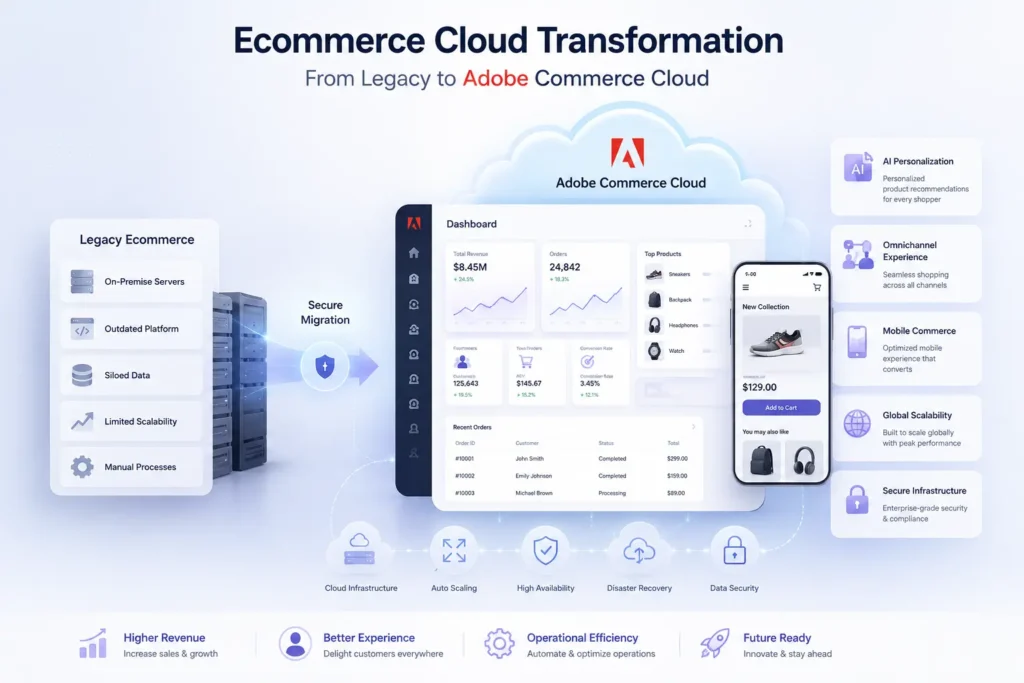
Adobe Commerce Cloud has evolved far beyond a traditional ecommerce hosting platform. Today, it has become a complete cloud-driven ecommerce ecosystem that helps businesses manage scalability, customer experience, integrations, security, and digital commerce operations more efficiently. Businesses looking to modernize their ecommerce infrastructure are increasingly choosing Adobe Commerce Cloud migration to build faster, more flexible, and future-ready online stores.Many organizations also rely on Magento Development Services to ensure a smooth migration process while minimizing operational risks.
At its core, Adobe Commerce Cloud is a cloud-based ecommerce platform designed to support web, mobile, marketplace, and omnichannel commerce experiences from a single ecosystem. It combines scalability, flexibility, AI-powered capabilities, and advanced integration support to help businesses manage growing ecommerce operations without operational complexity.
One of the biggest advantages of Adobe Commerce Cloud is its ability to support both B2C and B2B ecommerce businesses with customized digital commerce solutions. Businesses can manage large product catalogs, customer data, inventory systems, pricing models, promotions, and multi-store operations more effectively while maintaining consistent customer experiences across every touchpoint.
Another major shift happening in the Adobe Commerce ecosystem is the growing adoption of Adobe Commerce as a Cloud Service (ACCS). Unlike traditional platform hosting, ACCS introduces a fully managed SaaS-based approach that simplifies infrastructure management, improves scalability, reduces maintenance overhead, and delivers faster deployment cycles. This allows ecommerce businesses to focus more on innovation, personalization, and customer engagement rather than backend operational management.
Modern Adobe Commerce migration is also no longer limited to moving from Magento 1 to Magento 2. Businesses are now approaching migration from multiple perspectives, including:
- Magento version upgrades and platform modernization
- Migration from on-premise infrastructure to Adobe Commerce Cloud
- Moving towards Adobe Commerce as a Cloud Service (ACCS)
- Headless commerce and composable commerce transformation
- API-first ecommerce architecture modernization
- Ecommerce performance and scalability improvements
Each migration path comes with different timelines, complexity levels, infrastructure requirements, and business goals. This is why businesses now focus heavily on migration planning and technical discovery before starting the actual migration process.
One of the most underestimated parts of Adobe Commerce migration is data migration and platform restructuring. Product catalogs, customer records, order history, SEO URLs, third-party integrations, workflows, and business logic all require careful mapping and validation to avoid data loss, SEO issues, operational downtime, or customer experience disruptions.
A well-planned Adobe Commerce Cloud migration not only improves website performance and scalability but also prepares businesses for future ecommerce trends such as AI-driven personalization, headless commerce, mobile-first experiences, composable architecture, and omnichannel customer engagement.
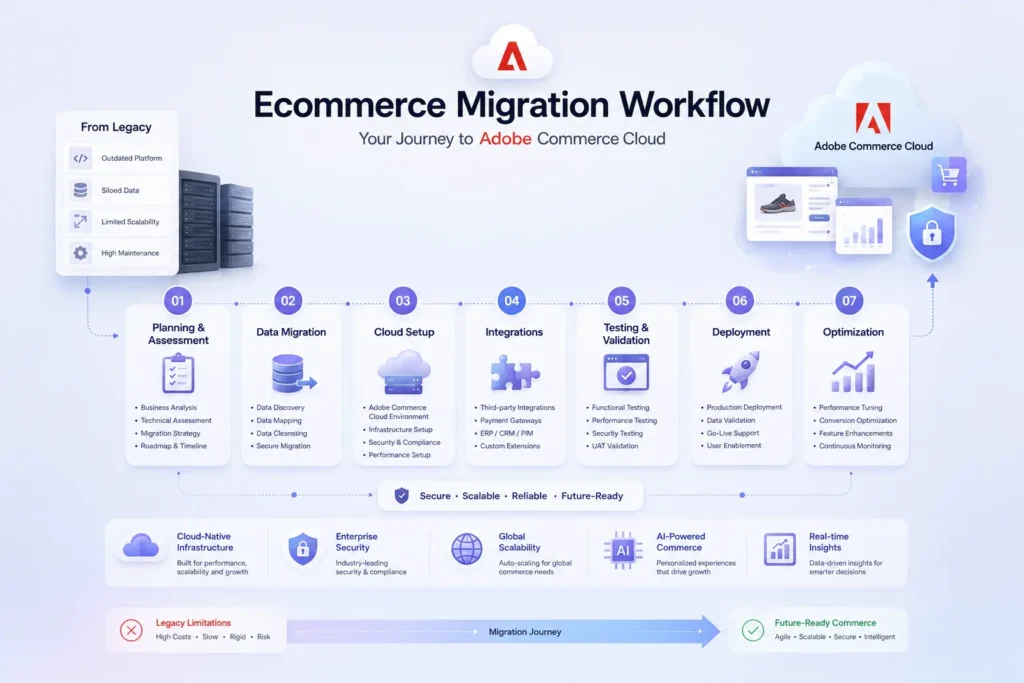
Adobe Commerce Cloud Migration Guide – Step-by-Step Process for 2026
A successful Adobe Commerce Cloud migration requires much more than simply moving data from one platform to another. Modern ecommerce migration involves infrastructure modernization, data validation, SEO preservation, cloud optimization, integration management, customer experience improvements, and long-term scalability planning.
Businesses today are increasingly adopting Adobe Commerce Cloud migration strategies to improve ecommerce performance, security, operational flexibility, and customer engagement. However, without proper planning and execution, migration projects can quickly create downtime, SEO losses, broken integrations, performance issues, and customer experience disruptions.
This is why businesses should follow a structured Adobe Commerce migration process that focuses on business continuity, scalability, and future ecommerce readiness.
Below is a detailed step-by-step Adobe Commerce Cloud migration guide for modern ecommerce businesses.
Step 1: Pre-Migration Planning and Business Analysis
Business and Infrastructure Assessment
The first stage of Adobe Commerce Cloud migration starts with a complete evaluation of your existing ecommerce ecosystem. Businesses should carefully analyze their current platform infrastructure, website performance, customer experience gaps, operational bottlenecks, integrations, and scalability limitations.
This stage helps businesses identify the areas that require modernization before migration begins. It also helps define realistic migration timelines, infrastructure requirements, and business priorities.
Nowadays, ecommerce businesses are no longer migrating only for platform upgrades. Most businesses now migrate to:
- Improve ecommerce scalability
- Enhance website performance
- Modernize customer experiences
- Improve mobile commerce capabilities
- Enable AI-powered personalization
- Support omnichannel commerce
- Reduce operational complexity
- Strengthen ecommerce security and compliance
Businesses should also identify technical debt, outdated extensions, unsupported integrations, and legacy workflows that may affect migration success later.
Stakeholder Alignment and Migration Strategy
Adobe Commerce migration impacts multiple departments, including IT, sales, marketing, operations, customer support, logistics, and finance teams. This is why stakeholder alignment becomes extremely important during the planning stage.
Businesses need to create a dedicated cross-functional migration team responsible for managing:
- Migration goals and timelines
- Technical planning
- Infrastructure decisions
- SEO preservation
- Customer communication
- Integration validation
- Testing and deployment workflows
Organizations should also involve Adobe support teams, cloud specialists, and technical consultants early in the process to reduce migration risks and improve deployment efficiency.
Infrastructure and Cloud Environment Evaluation
Businesses must evaluate their current hosting environment, server architecture, databases, APIs, third-party integrations, and cloud readiness before migration starts.
In 2026, many businesses are moving toward:
- Adobe Commerce Cloud
- Adobe Commerce as a Cloud Service (ACCS)
- Headless commerce architecture
- API-first ecommerce infrastructure
- Cloud-native ecommerce environments
During this phase, businesses should also identify compatibility issues with:
- Payment gateways
- ERP systems
- CRM platforms
- Marketing automation tools
- Inventory management systems
- Third-party Magento extensions
A detailed infrastructure audit helps reduce deployment issues during the final migration process.
Step 2: Adobe Commerce Data Migration and Validation
Data Inventory and Migration Planning
Data migration is one of the most critical stages of Adobe Commerce Cloud migration. Businesses should create a complete inventory of all ecommerce data before migration begins.
This includes:
- Product catalogs
- Customer accounts
- Order history
- Pricing structures
- Promotions and coupons
- Inventory records
- CMS pages and blogs
- SEO URLs and redirects
- Media files and assets
- Customer segmentation data
Businesses should prioritize critical ecommerce data to ensure business continuity during migration.
Data Cleansing and Optimization
Before migrating data, businesses should remove outdated, duplicate, or unnecessary records from the existing system. Poor-quality data often creates migration issues, slower performance, inaccurate reporting, and customer experience problems later.
Data cleansing improves:
- Platform performance
- Database efficiency
- Product search accuracy
- SEO management
- Inventory synchronization
- Customer segmentation
Modern Adobe Commerce migration projects also focus heavily on structured product data and SEO optimization to improve search visibility after migration.
Data Mapping and SEO Preservation
Proper data mapping is essential for maintaining operational continuity and SEO rankings during Adobe Commerce migration.
Businesses should carefully map:
- Product structures
- Customer hierarchies
- Order relationships
- URL structures
- Metadata and schema
- Category structures
- Internal linking architecture
SEO-critical URL mapping is especially important because broken URLs and missing redirects can significantly reduce organic traffic and ecommerce revenue after migration.
Step 3: Adobe Commerce Customization and Integration Setup
Ecommerce Platform Customization
Adobe Commerce Cloud offers extensive customization flexibility for modern ecommerce businesses. During migration, businesses should optimize the platform according to their operational needs and customer experience goals.
This includes:
- Custom storefront design
- Headless commerce implementation
- Mobile-first optimization
- PWA development
- Advanced checkout workflows
- AI-powered product recommendations
- Personalized shopping experiences
Businesses are also increasingly adopting composable commerce strategies to improve scalability and frontend flexibility.
Third-Party Integrations and API Connectivity
Most modern ecommerce businesses rely heavily on third-party integrations for smooth business operations. Many organizations seek Magento Consulting Services before migration to identify integration risks and optimization opportunities.
Common Adobe Commerce integrations include:
- ERP systems
- CRM platforms
- Payment gateways
- Shipping providers
- Marketing automation platforms
- Inventory management systems
- AI recommendation engines
- Analytics and reporting tools
Businesses moving toward Adobe Commerce as a Cloud Service should also evaluate API compatibility and App Builder requirements for future scalability.
Step 4: User Training and Organizational Adoption
Team Training and Platform Familiarization
Even the most advanced ecommerce platform can fail if internal teams are not properly trained. Businesses should conduct structured Adobe Commerce training programs for:
- Administrators
- Ecommerce managers
- Marketing teams
- Developers
- Customer support staff
- Operations teams
Training should cover platform workflows, reporting tools, catalog management, order management, personalization features, and operational best practices.
Change Management and Internal Adoption
Large ecommerce migrations often create internal resistance because teams are forced to adapt to new workflows and systems.
Businesses should clearly communicate:
- Migration benefits
- Operational improvements
- Performance expectations
- Customer experience improvements
- Automation capabilities
Strong internal communication helps accelerate adoption and minimizes operational confusion after launch.
Step 5: Quality Assurance and Pre-Launch Testing
Staging Environment and Testing Framework
Before going live, businesses should create staging environments that closely replicate the production infrastructure. This helps teams test migration workflows safely without affecting live customers.
Testing should include:
- Data validation
- Checkout functionality
- Mobile responsiveness
- API integrations
- Payment processing
- Performance optimization
- Security testing
- SEO validation
- CDN behavior testing
Businesses should also conduct smoke testing and load testing to identify traffic-related performance issues before deployment.
Regression Testing and Quality Validation
Regression testing ensures that existing ecommerce functionality continues working properly after migration.
This stage should validate:
- Product pages
- Search functionality
- Shopping cart behavior
- Customer login systems
- Inventory synchronization
- Marketing automation workflows
- Customer account functionality
Thorough testing minimizes downtime risks and protects customer experience during launch.
Step 6: DNS Cutover and Go-Live Deployment
Final Synchronization and Traffic Migration
Before final deployment, businesses should temporarily place the existing store into read-only mode to avoid transaction conflicts during migration.
Teams should then:
- Sync final database changes
- Transfer updated media files
- Refresh cache and indexing
- Validate DNS configurations
- Reduce DNS TTL settings
- Warm CDN and application cache
This process helps ensure a smoother traffic transition during launch.
Monitoring During Go-Live
The first few hours after Adobe Commerce Cloud migration are extremely important. Businesses should closely monitor:
- Website uptime
- Checkout performance
- Server response times
- Payment gateway activity
- API stability
- Customer login issues
- Traffic spikes
- Error logs and failed transactions
Fast issue resolution during this phase helps prevent revenue loss and customer frustration.
Step 7: Post-Migration Optimization and Continuous Improvement
Performance Monitoring and Analytics
Migration does not end after deployment. Businesses should continuously monitor platform performance and customer behavior after migration.
Key performance areas include:
- Core Web Vitals
- Mobile performance
- Conversion rates
- Bounce rates
- Cart abandonment
- Search behavior
- Customer retention
- Server response times
Analytics tools help businesses identify performance gaps and optimization opportunities faster.
Continuous Ecommerce Optimization
Modern ecommerce platforms require ongoing optimization to remain competitive. Businesses should continuously improve:
- Personalization strategies
- AI-powered recommendations
- Checkout experiences
- Mobile commerce functionality
- SEO performance
- Automation workflows
- Omnichannel customer experiences
Regular Adobe Commerce updates, extension audits, performance tuning, and security patching also help maintain a scalable and future-ready ecommerce ecosystem.
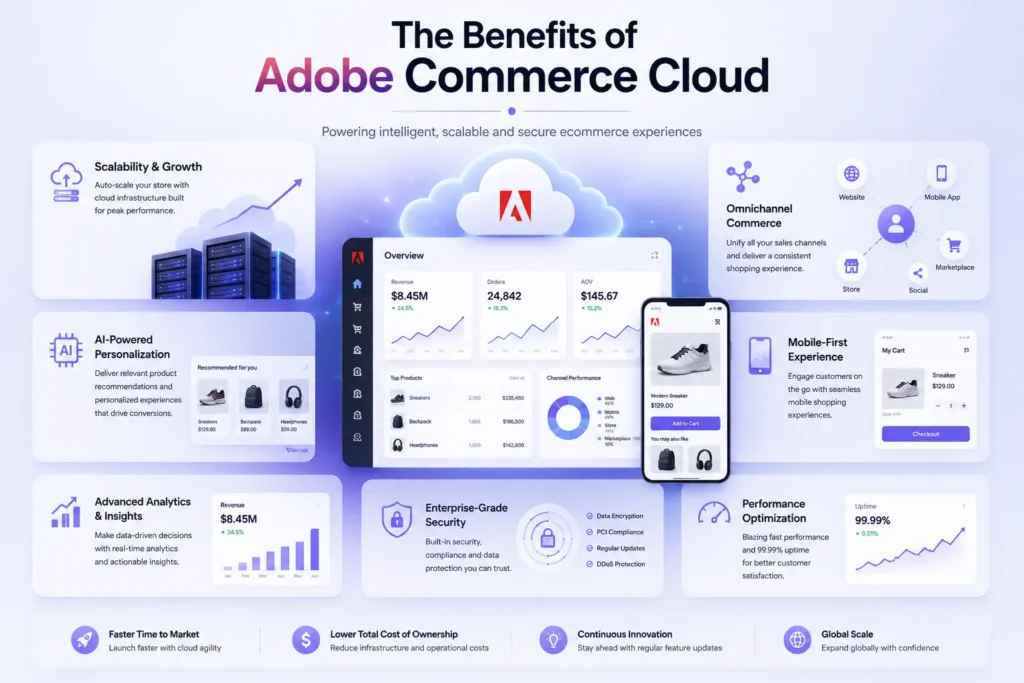
What Benefits Does Adobe Commerce Cloud Offer?
A well-planned Adobe Commerce Cloud migration can help ecommerce businesses improve scalability, customer experience, operational efficiency, and long-term digital growth. Businesses need more than just a functional ecommerce store. They need a cloud-powered platform that supports faster performance, AI-driven personalization, mobile commerce, automation, and seamless integrations. Adobe Commerce Cloud has emerged as one of the most reliable ecommerce platforms for businesses looking to modernize their digital commerce operations and stay competitive in a rapidly evolving market.
Scalability
Adobe Commerce Cloud offers a highly scalable ecommerce infrastructure that allows businesses to grow without performance limitations. Whether you manage a small online store or a large enterprise ecommerce platform, the system can efficiently handle increasing traffic, expanding product catalogs, seasonal sales spikes, and multi-store operations. This flexibility helps businesses scale smoothly while maintaining a fast and stable customer experience.
Customization and Integration
Ecommerce businesses often require tailored solutions that match their workflows, branding, and customer expectations. Adobe Commerce Cloud provides extensive customization capabilities that allow businesses to personalize storefronts, checkout processes, product catalogs, and customer journeys. The platform also supports seamless integration with ERP systems, CRM software, payment gateways, shipping providers, analytics tools, and marketing automation platforms, helping businesses build a connected ecommerce ecosystem.
Faster Performance and Better Customer Experience
Website performance plays a major role in ecommerce success. Adobe Commerce Cloud offers optimized cloud infrastructure, advanced caching, CDN support, and better Core Web Vitals performance to improve website speed and user experience. Faster loading pages, smoother navigation, and optimized checkout experiences help businesses reduce bounce rates, improve engagement, and increase conversions across desktop and mobile devices.
Personalized Shopping Experiences
Customer expectations have changed significantly in recent years. Shoppers now expect personalized product recommendations, targeted offers, and customized shopping journeys. Adobe Commerce Cloud supports AI-powered personalization through Adobe Sensei and advanced analytics capabilities. Businesses can deliver smarter product recommendations, dynamic content, personalized promotions, and behavior-based marketing campaigns that improve customer engagement and increase repeat purchases.
Omnichannel Commerce Experience
Customers interact with brands through websites, marketplaces, mobile apps, social platforms, and physical stores. Adobe Commerce Cloud helps businesses create a unified omnichannel ecommerce experience by connecting online and offline operations seamlessly. It supports centralized inventory management, multi-channel selling, marketplace integrations, and synchronized customer experiences across every sales channel, helping businesses improve operational efficiency and customer satisfaction.
Enhanced Mobile Commerce
Mobile commerce continues to dominate the ecommerce industry, making mobile optimization essential for business growth. Adobe Commerce Cloud supports responsive ecommerce experiences and Progressive Web App (PWA) development, helping businesses deliver fast, app-like experiences across smartphones and tablets. PWAs improve mobile performance, engagement, and conversion rates without requiring businesses to invest heavily in native mobile applications.
Global Expansion Support
For businesses planning international growth, Adobe Commerce Cloud offers built-in localization features that support multiple languages, currencies, tax structures, and regional storefronts. This allows ecommerce brands to create localized shopping experiences for customers across global markets while managing operations from a centralized platform. Such flexibility simplifies international expansion and improves customer trust in different regions.
Strong Security and Compliance
Security remains a top priority for ecommerce businesses in 2026. Adobe Commerce Cloud provides enterprise-grade security features that help businesses protect customer data, payment information, and operational systems. The platform supports PCI DSS compliance, secure payment processing, encryption, fraud detection, and regular security updates. These features help businesses reduce risks, maintain compliance standards, and build customer confidence.
Managed Cloud Infrastructure
Managing ecommerce infrastructure internally can become complex and expensive over time. Adobe Commerce Cloud simplifies operations through managed hosting, automated updates, performance monitoring, backup management, and cloud optimization services. This allows businesses to focus more on growth strategies, customer engagement, and innovation rather than handling server management and maintenance tasks.
Future-Ready Ecommerce Platform
Adobe Commerce Cloud is built to support future ecommerce technologies such as headless commerce, composable commerce, AI-driven experiences, and API-first development. Its flexible architecture allows businesses to adapt to changing customer demands and emerging digital trends without rebuilding their entire ecommerce infrastructure. This makes Adobe Commerce Cloud a long-term investment for businesses looking to build scalable, secure, and future-ready ecommerce ecosystems.
Conclusion – Why Adobe Commerce Cloud Migration Matters in 2026
Adobe Commerce Cloud migration is not simply a technical upgrade anymore. Today, it has become a business growth strategy for companies looking to improve scalability, customer experience, performance, security, and operational efficiency. As ecommerce competition continues to rise, businesses need flexible and future-ready commerce platforms that can support AI-driven experiences, omnichannel selling, faster website performance, and seamless integrations without creating unnecessary complexity.
Businesses that invest in the right migration approach often achieve better website stability, improved conversions, stronger customer engagement, and long-term operational flexibility. Ongoing Magento Support & Maintenance helps businesses keep their ecommerce platforms secure, optimized, and future-ready.
Whether you are upgrading an outdated Magento store, moving to Adobe Commerce Cloud, or modernizing your ecommerce architecture, staying aligned with the latest Adobe Commerce development practices can help your business remain competitive in the rapidly evolving ecommerce market.
Transform Your Ecommerce Store with IDS Logic
Planning an Adobe Commerce Cloud migration or Magento modernization project?
IDS Logic helps businesses build scalable, secure, and high-performing ecommerce solutions tailored to modern business requirements. From migration planning and custom Magento development to performance optimization and ongoing support, our experienced ecommerce specialists help ensure a smooth and future-ready digital commerce transformation.
Frequently Asked Questions
Q1. Why are businesses migrating to Adobe Commerce Cloud in 2026?
Businesses are migrating to Adobe Commerce Cloud to improve scalability, website performance, customer experience, security, and operational efficiency. The platform also supports AI-driven personalization, omnichannel commerce, and future-ready ecommerce architecture.
Q2. What is the difference between Adobe Commerce Cloud and Adobe Commerce as a Cloud Service (ACCS)?
Adobe Commerce Cloud is a managed cloud-based ecommerce platform, while ACCS is Adobe’s newer SaaS-based commerce model with automatic updates, managed infrastructure, and deeper Adobe Experience Cloud integration.
Q3. Does Adobe Commerce Cloud support headless commerce development?
Adobe Commerce Cloud supports headless and composable commerce architecture through APIs, GraphQL, and flexible frontend integrations. This helps businesses create faster and more personalized customer experiences.
Q4. Can Adobe Commerce migration affect SEO rankings?
Yes, if migration is not handled properly. Businesses should carefully manage URL mapping, redirects, metadata, structured data, and site architecture during migration to protect SEO performance and search visibility.
Q5. How important is data cleansing before Adobe Commerce migration?
Data cleansing is extremely important because outdated, duplicate, or inaccurate data can create migration issues, performance problems, and reporting inaccuracies after deployment.
Q6. What are the common challenges during Adobe Commerce migration?
Some common challenges include extension compatibility issues, third-party integration failures, data mapping errors, performance bottlenecks, and improper testing before launch.
Q7. Is Adobe Commerce Cloud suitable for B2B ecommerce businesses?
Adobe Commerce Cloud is highly suitable for B2B ecommerce because it supports custom pricing, account hierarchies, bulk ordering, ERP integrations, advanced catalogs, and complex workflows.
Q8. What happens after Adobe Commerce migration is completed?
Post-migration activities usually include performance monitoring, security audits, SEO checks, analytics setup, bug fixing, cache optimization, and continuous improvements based on customer behavior and business goals.
Q9. How does Adobe Commerce Cloud improve mobile commerce?
Adobe Commerce Cloud supports responsive design, mobile optimization, and Progressive Web Apps (PWAs), helping businesses deliver faster and smoother shopping experiences across smartphones and tablets.
Q10. Why should businesses work with an experienced Magento development company for migration?
Experienced Magento and Adobe Commerce developers like the ones at IDS Logic help reduce migration risks, improve implementation quality, handle integrations properly, optimize performance, and ensure a smoother transition with minimal downtime.