
Top Benefits of Using SharePoint Application Development for your Business
Increasing productivity and strengthening teamwork are two main goals of every organization. The digital workplace solution of SharePoint has become a trusted digital workplace for businesses when teams are aligned and information is easily accessible. This allows teams to collaborate, share ideas, manage content, and automate tasks from anywhere.
But SharePoint is no longer just a file storage or document sharing tool. In 2026, companies are using SharePoint application development to build custom business solutions that match their exact processes. Whether a business needs an internal portal, workflow automation, a compliance system, or a smart document hub, SharePoint makes it possible without heavy development effort.
Remote and hybrid work continue to grow. Studies show over 58% of companies now prioritize cloud-based collaboration tools for smooth teamwork. SharePoint supports this shift by allowing authorized users to access files, update content, and track progress from anywhere with just a web browser.
It also helps organizations bring scattered tools together. Instead of switching between different apps, teams can work in one secure platform where data stays organized and fully controlled. With strong security, customizable workflows, and Microsoft 365 integration, SharePoint supports business efficiency at every level.
This results in the increasing demand for SharePoint application development services. More businesses now prefer customized SharePoint solutions because they help improve operations, ensure compliance, and make communication simpler across departments, locations, and devices.
This article explores the key benefits of SharePoint and how they are helping businesses grow in a more connected and competitive world.
Role of SharePoint Application Development in Modern Business
The SharePoint platform supports fast access to information, sharing updates, and staying aligned across teams. SharePoint acts as a single platform where everyone can find documents, share updates, and stay aligned across teams. The web browser allows employees to access the files and tools they need regardless of whether they are in the office, traveling for work, or working at home.
SharePoint is fully connected with Microsoft 365. This makes collaboration smooth through team sites, real-time editing, version control, and automated workflows. It keeps conversations, documents, and tasks organized in one space instead of scattered across many apps. This helps teams save time and avoid confusion.
Businesses are also choosing SharePoint application development services to build custom tools on top of SharePoint. These applications help meet specific needs such as approvals, compliance checks, performance dashboards, or onboarding portals. Since these apps run inside SharePoint, users feel comfortable and do not need to learn a new system.
SharePoint has evolved with low-code tools like Power Apps and Power Automate. This allows organizations to automate repeat work, capture data smarter, and build new solutions without heavy coding. As a result, teams work faster and operations become easier to manage.
Today, remote working is a standard part of business, and over 60% of companies prioritize cloud-based collaboration platforms over traditional methods. SharePoint facilitates this shift by keeping work secure yet accessible. Workflows run smoothly with built-in permissions, encryption, and compliance features.
As organizations move toward digital transformation, SharePoint continues to play a major role in bringing people, processes, and information together. Through SharePoint, businesses can improve productivity, reduce manual effort, and scale operations efficiently.
Top Benefits of Using SharePoint Application Development Services
SharePoint has become a vital business platform because it brings people, content, and processes together in one intelligent workplace. With custom SharePoint application development services, organizations can refine how their teams collaborate, simplify workflows, and gain control over data operations.
Let’s explore the major benefits that make SharePoint a preferred solution for modern businesses:
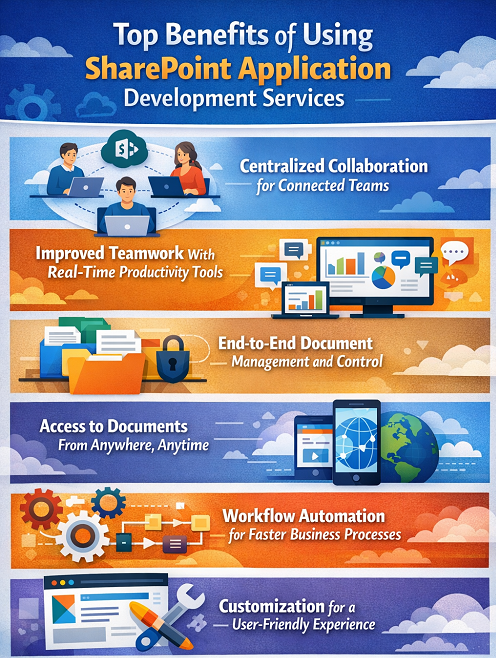
Centralized Collaboration for Connected Teams
Teams work better when information is easy to access and share. SharePoint serves as a shared workspace where discussions, documents, and updates stay organized, helping everyone move in the same direction. Real-time co-authoring ensures that multiple users can edit documents together without version confusion.
Whether your teams are based in Mumbai, Bangalore, or working remotely, SharePoint keeps communication smooth and encourages a culture of teamwork. This unified approach boosts engagement and accelerates decision-making.
Improved Teamwork With Real-Time Productivity Tools
SharePoint eliminates long email threads and file mismatch issues. Employees always see the latest version of a file and can quickly exchange notes, attach references, or tag teammates. This helps projects move faster and reduces errors that slow down operations.
Project members stay informed through notifications and shared calendars, making teamwork clear and effortless.
End-to-End Document Management and Control
Document chaos can slow down any organization. SharePoint replaces traditional network drives with a secure repository where files are:
- Indexed and searchable
- Structured meaningfully
- Protected with access controls
- Automatically versioned
- Stored for the entire lifecycle
It supports document creation, approvals, publication, compliance tracking, and archiving, all inside one system. Teams spend less time searching and more time completing tasks that matter.
Access to Documents From Anywhere, Anytime
Work is no longer tied to a desk. SharePoint gives employees on-the-go access to documents through:
- Mobile apps (Android & iOS)
- Browser-based portals
- Cloud-based SharePoint Online
Hybrid and field workers remain productive from anywhere – client sites, production floors, airports, or home. Offline sync further supports flexibility when internet connectivity is unstable. This ensures business continuity and consistent performance every day.
Workflow Automation for Faster Business Processes
Routine tasks like approvals, onboarding, support tickets, and audit updates often consume unnecessary time. SharePoint automates these processes using:
- Built-in workflows
- Power Automate (low-code automation)
- Custom triggers and alerts
Automation eliminates bottlenecks and reduces human errors. Organizations can also monitor and optimize workflows to improve turnaround times and customer response. This results in less manual work, less cost, and ultimately more productivity
Customization for a User-Friendly Experience
Every organization has its own way of working. Custom SharePoint development helps shape the platform to match those needs.
Customization for a User-Friendly Experience
- Personalized dashboards and quick links
- Department-based sites and navigation
- Branding for stronger identity
- Role-based content visibility
- Custom forms for data entry
- Personalized workflows for business-specific processes
This increases adoption and encourages employees to use SharePoint daily.
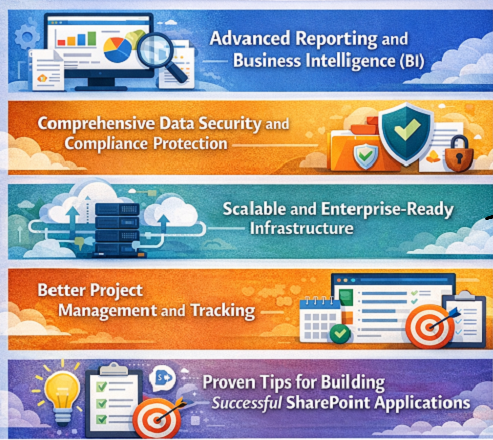
Advanced Reporting and Business Intelligence (BI)
SharePoint brings business insights into focus. It integrates with Power BI and other analytics tools to:
- Build dashboards with live data
- Track KPIs and performance trends
- Map insights from different business systems
- Provide actionable intelligence for leaders
Decision-makers get complete visibility into operations and can solve problems before they escalate.
This data-driven approach strengthens planning and improves long-term outcomes.
Comprehensive Data Security and Compliance Protection
Cybersecurity threats are increasing each year. SharePoint protects sensitive files with:
- Encryption at rest and during transfer
- Advanced role-based permissions
- Multi-factor authentication
- Audit trails and access monitoring
- Information Rights Management (IRM)
These tools help organizations meet compliance demands in banking, government, healthcare, education, and other regulated industries. You can collaborate confidently knowing your critical data stays secure.
Scalable and Enterprise-Ready Infrastructure
SharePoint evolves with your business needs. Whether a start-up expands into new locations or a growing enterprise increases its data load, SharePoint scales without a complete rebuild.
It can:
- Support more users simultaneously
- Handle large document libraries
- Integrate new solutions over time
- Maintain strong performance under load
Better Project Management and Tracking
Project success depends on clarity and timely updates. SharePoint centralizes every project file, task list, and timeline within a managed site where teams can track status instantly.
Project managers can:
- Monitor deadlines and task progress
- Automate approvals and signatures
- Share updated content on a single page
- Reduce delays caused by scattered communication
This ensures smoother delivery, fewer risks, and better stakeholder satisfaction.
Proven Tips for Building Successful SharePoint Applications
The development of an effective SharePoint application is not just about coding. The application must solve real business challenges, simplify work, and make it easy for employees to work with it. When planned carefully, SharePoint becomes a smart workplace that keeps getting better as time goes on.
Here are the recommended best practices to follow for SharePoint application development services:
Start With a Clear Objective
Before jumping into development, identify what is not working today. Speak with teams to understand the real issues:
- Is approval too slow?
- Are documents hard to find?
- Is reporting inaccurate or delayed?
Once the purpose is clear, the application can deliver the right outcomes and improve daily productivity.
Use Modern SharePoint Development Standards
Using the SharePoint Framework (SPFx) for SharePoint Online makes the most sense. The solution supports fast, responsive, user-friendly solutions that are integrated very well with Microsoft Teams. In addition to providing consistent branding and better performance across devices, SPFx makes the app more familiar to your employees right away.
Focus on User Experience and Simplicity
People enjoy tools that are clear, quick, and clean. So:
- Keep navigation simple
- Make sure it works on all screen sizes
- Use Microsoft’s Fluent UI design elements
- Highlight only what users need
Strong UX means higher adoption and better results.
Use Power Platform for Automation and Data
Power Apps, Power Automate, and Power BI work hand-in-hand with SharePoint:
- Power Apps enables teams to build forms and mobile-ready apps
- Power Automate allows businesses to automate routine tasks
- Power BI offers rich data visualization and actionable insights
This combination ensures your SharePoint solution becomes smarter with time.
Build With Security and Compliance First
Industries like BFSI, healthcare, education, and government must meet strict compliance rules. This keeps sensitive business information protected at all times.
Plan security from the beginning:
- Set role-based access
- Enable audit trails
- Follow data governance policies
Plan for Future Enhancements
Business needs will evolve. A good SharePoint application grows along with your organization. So make the application easy to update and scale:
- Document how it works
- Collect user feedback regularly
- Release improvements in phases
Test With Real Users Before Launching
Testing early prevents long-term rework and dissatisfaction. Run usability tests with employees from different teams:
- Try different devices
- Validate browser compatibility
- Check speed and navigation flow
- Fix pain points before going live
Integrate With Your Digital Ecosystem
To unlock maximum value, connect SharePoint with tools your teams use every day:
- Teams for communication
- Outlook for approvals
- OneDrive for personal documents
- ERP/CRM for synced business data
With SharePoint development, you create one united workplace where everything functions together, no need to switch between apps.
Conclusion
Businesses can manage daily operations more effectively and efficiently with SharePoint application development services. Whether it’s secure collaboration and automated workflows, or centralized content and mobile access, SharePoint applications keep teams connected and productive, wherever they are. Designed to work with your unique processes, these applications reduce manual work, remove bottlenecks, and improve communication throughout the organization.
Digital workplaces continue to evolve rapidly. That’s why choosing the right SharePoint development partner matters. A skilled and experienced team will ensure your solutions remain optimized, scalable, and ready to support your next stage of growth. With the right guidance and ongoing enhancement, SharePoint can deliver long-term gains in productivity, security, and business agility.
If you’re planning to streamline your operations or modernize your workplace, IDS Logic is here to help. We design SharePoint applications that bring real value to your business – today and in the future.
Let’s build your next SharePoint success story together.
Frequently Asked Questions
Q1. How long does it take to develop a custom SharePoint application?
The duration depends on how complex the features are. A basic workflow app can take 3-6 weeks, while a fully integrated enterprise solution may take 2-6 months. A detailed discovery phase at the start helps define timeline, scope, and required integrations clearly, so there are no surprises later.
Q2. Can SharePoint connect with our existing business systems?
Yes. SharePoint integrates well with CRMs, ERPs, HRMS platforms, and industry-specific tools through APIs or Microsoft connectors. When properly planned, this creates a single source of truth, so teams don’t have to switch between systems or work with duplicate data.
Q3. Will SharePoint applications support remote and field employees?
Definitely. SharePoint Online is cloud-based and works through a browser or mobile app. Employees can securely upload files, submit approvals, or access project information from home, client sites, or while traveling. This makes it ideal for hybrid teams and organizations with multiple offices.
Q4. How secure is data stored in SharePoint applications?
SharePoint includes enterprise-level protection such as encryption, MFA, permissions control, compliance rules, and audit logs. Even if files are shared externally, policies prevent unauthorized access or misuse. This security makes SharePoint a strong fit for regulated sectors like finance, healthcare, legal, and education.
Q5. Can SharePoint applications help reduce software and maintenance costs?
Yes. Many businesses use multiple separate tools for tasks like approvals, document management, support tickets, or reporting. A single SharePoint application can replace all those extra systems, helping reduce:
- Licensing fees
- User onboarding time
- IT maintenance workload
It also increases adoption since employees already know Microsoft 365.
Q6. What kind of post-launch support does IDS Logic provide?
We offer complete maintenance, updates, performance optimization, and user support to ensure your SharePoint application continues working smoothly. As your business grows, we can add new features, improve workflows, or upgrade integrations, so your solution remains future-ready and aligned with evolving business needs.