What are the Advantages of Using Moodle Mobile App?
The way people learn has changed. Today’s learners want quick, flexible, and mobile-friendly solutions. Recent studies show that mobile learning can increase productivity by 43%, as learners access information at their own pace. This flexibility helps them absorb knowledge faster and apply it more effectively in real life.
For businesses, the impact is even bigger. Organisations that embraced LMS mobile apps saw a 55% boost in overall performance because employees could complete training on the move. This shift has turned mobile learning into more than just a trend, it’s now a core strategy for improving both learning outcomes and business results.
The Moodle mobile app is a prime example. It offers offline learning, instant notifications, and easy access to resources. These features make training and education more practical and engaging for both students and professionals. As a result, Moodle has become one of the most reliable platforms for delivering learning that fits into modern lifestyles.
In this blog, we’ll highlight the key benefits of the Moodle mobile app, explore why it matters for both students and organisations, and show how it can transform learning into a flexible, on-the-go experience.
Benefits of Using the Moodle Mobile App
The Moodle mobile app makes learning flexible and accessible, no matter where you are. It helps students and professionals stay connected to their courses, even when internet access is limited. With offline features, real-time updates, and easy navigation, Moodle ensures learning doesn’t stop because of location or connectivity challenges.
A real-life example is Mwabu, a company supporting African teachers. They customized the Moodle app to deliver offline-first learning in areas with limited resources. The result? Students showed a 10% improvement in math scores and a 12.4% boost in oral vocabulary skills. This success highlights the advantages of Moodle in breaking barriers and making education accessible for all.
Let’s explore the seven major benefits of the Moodle app for learners and organizations:
Easy Access Anytime
Learners can open content on the go, whether at home, in transit, or during short breaks. With offline downloads, learning continues without WiFi.
Push Notifications
The app syncs with the Moodle calendar, sending reminders for deadlines, assignments, and forum updates. This keeps learners on track.
Seamless Integration
The app connects smoothly with Microsoft 365, Google Workspace, and even social tools. This makes the LMS mobile app a one-stop solution for study and collaboration.
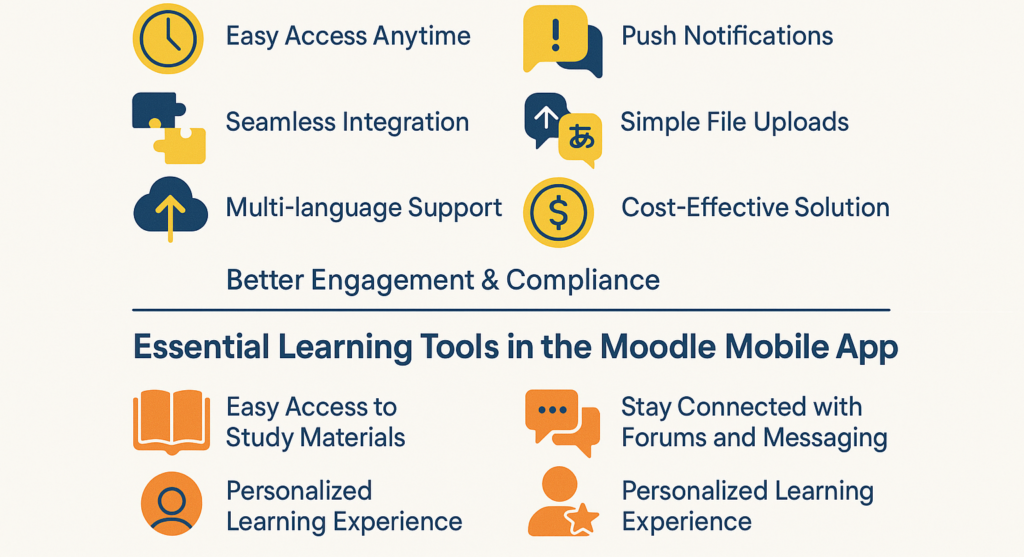
Simple File Uploads
Students can upload assignments, images, videos, or audio files directly from their phone. File sizes up to 50 MB are supported, making sharing easy.
Multi-language Support
The app is designed for global learners. With multilingual features, students can access help and content in their native language.
Cost-Effective Solution
Being open-source, Moodle remains free to use. Whether for a small school or a large enterprise, the Moodle mobile app features add value without extra licensing costs.
Better Engagement & Compliance
Notifications for mandatory training, easy access to modules, and a mobile-first design keep learners motivated. Organisations benefit from higher completion rates and stronger compliance.
Essential Learning Tools in the Moodle Mobile App
Learning doesn’t have to stop when you leave the classroom or office. The Moodle mobile app puts everything you need in one place, making study sessions smoother, quicker, and more accessible. Here’s a look at the tools that make learning easier on the go.
Easy Access to Study Materials
With the Moodle mobile app, learners can instantly reach all their study resources right from their phones. Whether it’s documents, presentations, or videos, everything is available in one place. Even better, these files can be downloaded for offline use, so learning doesn’t stop when the internet does. This flexibility makes it easier for students and professionals to keep up with their training anytime, anywhere.
Stay Connected with Forums and Messaging
The app makes collaboration simple. Learners can join group discussions, share questions, and exchange ideas through built-in forums. Direct messaging also allows quick conversations with teachers and peers, keeping the entire learning community connected. This two-way communication encourages active participation and builds stronger engagement with the course.
Personalized Learning Experience
Everyone learns differently, and the Moodle mobile app respects that. Users can adjust their language preferences, manage notifications, and set up the app to match their style of learning. These simple personal touches make the app feel more tailored, helping learners stay more engaged and comfortable with their progress.
Smart Features That Keep Learners on Track
Beyond just resources, the Moodle mobile app also helps learners stay organised and motivated. From progress tracking to reminders, these features ensure no important task slips through the cracks.
Real-Time Progress and Grades
Tracking progress is simple with Moodle’s mobile app. Learners can check grades on the go, see instructor feedback, and keep an eye on their overall performance. Having this visibility motivates them to stay focused while also giving them clear insights into where they can improve.
Integrated Calendar for Deadlines
The built-in calendar ensures important dates are never forgotten. Assignment deadlines, upcoming exams, and course events are all highlighted within the app. This feature helps learners plan ahead and manage their time more effectively, skills that are just as valuable outside the classroom.
Timely Reminders and Notifications
Nobody likes missing a deadline. With instant push notifications, learners receive reminders about new announcements, assignments, and forum activity. These alerts keep learners up to date and ensure they never fall behind on important tasks.
Wrapping It Up: Why the Moodle Mobile App Matters
The Moodle Mobile App makes it possible for learners to carry their classroom in their pocket. Whether it’s checking grades during a commute, downloading lessons for offline use, or staying updated with instant notifications, the app gives freedom and convenience without compromising on quality.
Mobile learning is no longer optional, it’s the way people prefer to learn today. By offering accessibility, personalisation, and stronger engagement, the Moodle app ensures education keeps up with modern lifestyles. It bridges the gap between traditional training and today’s mobile-first needs, giving both students and teachers tools that work in real life.
One of Moodle’s biggest strengths is how smoothly its app syncs with the web version. This means no matter where learners log in, desktop or phone, the experience feels seamless. Educators benefit from easier course management, while learners enjoy continuity without missing a beat.
As technology continues to shape how people learn, the Moodle Mobile App stands out as a reliable companion. It helps educators reach learners wherever they are and empowers students to study on their own terms. By embracing the app, organisations, schools, and individuals can make education more accessible, engaging, and future-ready.
Frequently Asked Questions
Q1. Can the Moodle Mobile App be used offline?
Yes. Learners can download lessons, documents, and videos to study without internet access. This makes it especially useful for those who travel often or live in areas with limited connectivity.
Q2. Does the Moodle app support multimedia learning?
Absolutely. The app allows learners to view videos, listen to audio lessons, and interact with images and presentations. This variety makes learning more engaging and caters to different learning styles.
Q3. How secure is the Moodle Mobile App?
Moodle follows strong security practices. User data is protected, and institutions can set their own privacy rules. Learners can safely access their courses without worrying about data risks
Q4. Can teachers manage courses through the app?
Yes, educators can post updates, send reminders, grade assignments, and respond to questions right from the app. This makes course management easier and more flexible.
Q5. Is the Moodle Mobile App free to use?
The app itself is free to download and use. However, access to courses depends on the school, university, or organisation providing them. Many institutions include mobile access as part of their Moodle setup.